Appendix D - Mumps 95 Pattern Matching
Part I - Programmers Guide
Software Distribution
Source code distributions are available at:
http://www.cs.uni.edu/~okane
Important Notes:
-
Details on installation of the Toolkit for Linux, Windows XP and Cygwin
are contained in the Mumps Compiler Manual (compiler.html) which is
part of the distribution package as well as operating specific "INSTALL"
files contained in the distribution.
-
Stack size can be an issue for some functions, most notably the Smith-Waterman
alignment procedure. The stack size is set for WindowsXP programs
in the file "mumpsc.bat" in the batch variable "STACK" which is
set, by default, to 5,000,000. It may be raised (or lowered)
as needed. The stack size is set for Linux in the "ulimit:
command. This can be increased under Linux with the command:
ulimit -s unlimited
(Other options are ulimit -a and ulimit -aH to show limits).
Introduction
The MDH (Multi-Dimensional and Hierarchical) Database Toolkit is a
Linux-based, open sourced, toolkit of portable software that supports
fast, flexible, multi-dimensional and hierarchical storage,
retrieval and manipulation of information in data bases ranging in
size up to 256 terabytes. The package is written in C and C++ and is
available under the GNU GPL/LGPL licenses in source code form. The
distribution kit contains demonstration implementations of
network-capable, interactive text and sequence retrieval tools that
function with very large genomic data bases and illustrate the
toolkit's capability to manipulate massive data sets of genomic
information.
The toolkit is distributed as part of the Mumps Compiler
Versions exist for Linux, Cygwin, the DJGPP port of the
GCC compiler for Windows XP and the command line version
of the MicroSoft Visual C++ Compiler
The toolkit is a
solution to the problem of manipulating very large, character string
indexed, multi-dimensional, sparse matrices. It is based on Mumps
(also referred to as M), a general purpose programming
language that originated in the mid 60's at the Massachusetts
General Hospital. The toolkit supports access to the PostgreSQL
relational data base server, the Perl Compatible Regular Expression
Library, the Berkeley Data Base, and the Glade GUI builder as well as
server-side development of interactive web pages.
The principal database
feature in this project is the global array which permits
direct, efficient manipulation of multi-dimensional arrays of
effectively unlimited size. A global array is a persistent, sparse,
undeclared, multi-dimensional, string indexed data disk based
structure. A global array may appear anywhere an ordinary array
reference is permitted and data may be stored at leaf nodes as well
as intermediate nodes in the data base array. The number of
subscripts in an array reference is limited only by the total length
of the array reference with all subscripts expanded to their string
values. The toolkit includes several functions to traverse the data
base and manipulate the arrays.
The toolkit makes the
data base and function set available as C++ classes and also permits
execution of legacy Mumps scripts. To use the toolkit, you
install the MDH and Mumps distribution kit and related code.
Creating Global Arrays
The class, function and macro libraries primarily operate on global
arrays. Global arrays are undimensioned, string indexed, disk resident data
structures whose size is limited only by available disk space. They
can be viewed either as multi-dimensional sparse matrices or as tree
structured hierarchies. Global arrays are a C++ class and must be
declared or instantiated in your C++ program as an instance of
the global. For example, to create the global named "gbl",
do the following:
      #include <mumpsc/libmpscpp.h>

      global gbl("gbl");
The instantiation consists of two parts: the name of the global array
object and the name of the global array on disk associated with this
object. In the above example, these are both "gbl". Note that
the disk name of the global is enclosed in a parenthesized character string
expression following the object name. The name in the expression need
not (but usually does) match the name of the object. The name
given in the parenthesized character string is the disk name of the global
array. The global array object is associated with the disk name
when the object is created.
When the object is destroyed, the disk based global array
persists.
Note: programs that use global arrays MUST close the array file system with
the GlobalClose; command before exiting. Failure to do so may
corrupt the file system.
Global objects may be created through declarations as shown above or
dynamically:
      global *gptr;
      gptr = new global ("gbl_name");
      (*gptr)("1","2","3") = "test";
which is equivalent to:
      global g("gbl_name");
      g("1","2","3") = "test";
The #include <mumpsc/libmpscpp.h> statement brings in
the necessary header files for you C++ program. These include, in
addition to the header files necessary to access the toolkit, the
standard system libraries:
      #include <iostream>
      #include <iomanip>
      #include <string>
      #include <string.h>
      #include <math.h>
      #include <stdlib.h>
These are referenced at
the beginning of libmpscpp.h.in and you may modify them if your
system uses different naming conventions.
Each global declaration creates a global array name
(gbl) to be an object or instance of the global class.
Each global array you use must be first declared to be an object of
the global class.
Global names can be any valid C/C++
variable name.
A global array will typically have one or more subscripts as
discussed below. These will be of type mstring, or
a null terminated array of char.
Subscripts of global arrays must evaluate to a printable characters
in the range of decimal 32 (space) to, but not including, tilde (~).
Note:
No data types other than mstring, or
null terminated array of char (i.e., char *) may be used as subscripts.
Numeric data types (int, short, long, float, double, etc.) may
not be used as global array subscripts.
Also, in any given global array reference, all the indices must be
of the same data type (mstring or char *
mstring is a data type (class) whose behavior is similar to the basic
typeless string data type in Mumps. Objects of mstring are stored
internally as strings but may contain text,
integers and floating point values. Addition, multiplication,
subtraction, division, modulo, and concatenation may be performed
directly on mstring objects (see details below).
Many of the following examples use mstring objects.
Structure of Global Arrays
Global arrays may be viewed either as multi-dimensional matrices or
as tree structured hierarchies. As matrices, data may be stored not only at fully
subscripted matrix elements but also at other levels. For
example, given a three dimensional matrix mat1, you could
initialize it as follows:
|
#include <mumpsc/libmpscpp.h>
global mat1("mat1");
int main() {
mstring i,j,k;
for (i=0; i<100; i++)
for (j=0; j<100; j++)
for (k=0; k<100; k++) {
mat1(i,j,k)=0;
}
GlobalClose;
return 0;
}
Alternatively, the above can be performed with int but the
numeric indices must be converted to mstring before use:
#include <mumpsc/libmpscpp.h>
global mat1("mat1");
int main() {
int i,j,k;
for (i=0; i<100; i++)
for (j=0; j<100; j++)
for (k=0; k<100; k++) {
mat1(mcvt(i),mcvt(j),mcvt(k))=0;
}
GlobalClose;
return 0;
}
|
In this example, all the
elements of a three dimensional matrix of 100 rows, 100 columns and
100 planes are initialized to zero. The function mcvt()
converts from int to mstring.
In the view expressed by the code above, the matrix is a traditional
three dimensional structure with data stored at each fully indexed
position or node.
Unlike other programming
languages, however, there are additional nodes of the matrix which
could have been initialized such as indicated by the following example:
|
#include <mumpsc/libmpscpp.h>
global mat1("mat1");
int main() {
mstring i,j,k;
for (i=0; i<100; i++) {
mat1(i)=i;
for (j=0; j<100; j++) {
mat1(i,j)=j;
for (k=0; k<100; k++) {
mat1(i,j,k)=0;
}
}
}
return 0;
}
|
In effect, this means
that mat1 can also be a single dimensional vector, a two
dimensional matrix and a three dimensional matrix simultaneously.
Furthermore, not all elements of a matrix need exist. That is, the matrix can be sparse.
For example:
#include <mumpsc/libmpscpp.h>

      global mat1("mat1");

      int main() {
      mstring i,j,k;
      for (i=0; i<100; i=i+10)
            for (j=0; j<100; j=j+10) {
                  for (k=0; k<100; k=k+10) {
                        mat2(i,j,k)=0;
                        }
                  }
            }
      return 0;
      }
|
In the above, only index values 0, 10, 20, 30, 40, 50, 60, 70, 80, and 90
are used to create each of the dimensions of the array and only those elements of the
matrix are created. The omitted elements do not exist.
For example, if you are running a drug protocol on a number of patients and
are dosing with medications M1, M2, M3, ... on patients P1, P2, P3, ... and
collecting observations on days D1, D2, D3, ... you could create a
three dimensional matrix named protocol in which each plane
consisted of the observations for each patient on each medication for
a given day:
-
|
D1
|
D2
|
D3
|
D4
|
|
|
M1
|
M2
|
M3
|
M4
|
M5
|
|
M1
|
M2
|
M3
|
M4
|
M5
|
|
M1
|
M2
|
M3
|
M4
|
M5
|
|
M1
|
M2
|
M3
|
M4
|
M5
|
|
P1
|
|
|
|
|
|
P1
|
|
|
|
|
|
P1
|
|
|
|
|
|
P1
|
|
X
|
|
|
|
|
P2
|
|
|
|
|
|
P2
|
|
|
|
|
|
P2
|
|
|
|
|
|
P2
|
|
|
|
|
|
|
P3
|
|
|
|
|
|
P3
|
|
|
|
|
|
P3
|
|
|
|
|
|
P3
|
|
|
|
|
|
You could refer to
patient P1, medication M2 on day D4 with the reference:
protocol("P1","M2","D4")="X";
Alternatively, you can
view the same data base as a tree structure with patient id at the
root, followed by medication, followed by day of study:
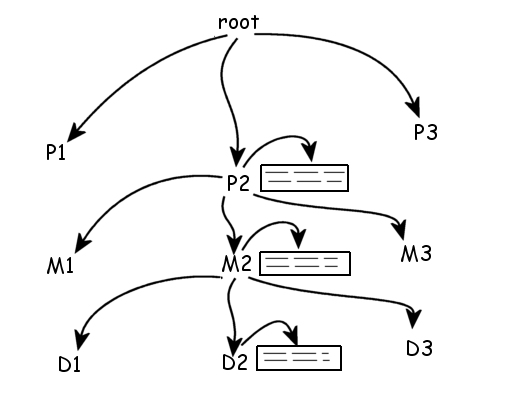
Note that at each node
in the tree, a data box may appear containing information about the
node. Addressing a node is accomplished by giving its path
description such as:
protocol("P2","M2",D2)
Compiling
Programs
To compile programs
written in C++ that use the MDH (multi-Dimensional and Hierarchical) library, use the
command:
mumpsc myprog.cpp
This will invoke the g++
compiler and make available the necessary libraries. The result will
be a program named myprog which is executable. The cgi
extension is used as the default because very often these programs
may be used in connection with web servers. You may rename the
program as you see fit, however. The script mumpsc is
part of the Mumps Compiler which must be installed prior to using the
toolkit.
Accessing Global Arrays
Note: prior to exiting a
program that accessed globals arrays, you must
execute a GlobalClose macro to shut down the global array facility.
This flushes the system buffers to disk and insures that
the file system if properly closed.
Failure to do this will result in data base errors.
This appears in your program as:
GlobalClose;
You may assign global arrray elements to variables of
type mstring using the assignment operator(=).
You may assign values of type
int,
float,
double,
mstring,
string and
char * to global array elements using the
assignment operator (=).
When global array references are passed to function, no more than one
instance of the same global object should be used in the argument
list. Each global object maintains a private static string
which contains the most recent value fetched from the data base.
When a global object is passed to a function, its
this string value is effectively passed. This means that,
in a function reference where two references to the
same global object are passed, even though they have differing
indices, the value passed will be the value for
the second instance of the global. This restriction
only applies where there are two or more instances of the
same global.
If you use a reference to a global without a parenthesized list
following the name of the global, the reference will
be to the most recent referenced global.
Effectively, this is similar to the "naked indicator" from Mumps.
Global Array Indices
Internally, the indices
of global arrays are always stored as character strings.
If you initialize a global
array with a loop, you must insure that the indices are represented
as either values of type mstring or null terminated
arrays of type char.
Indices to globals may be
either char* or mstring but MUST
all be of the same type (i.e. all char *
or all mstring).
For example:
      mstring A,B,C;
      for (A=0; A<1000; A++)
            for (B=0; B<1000; B++)
                  for (C=0; C<1000; C++) {
                        array1(A,B,C) = "0";
                        }
|
The above initializes an array of 1 billion elements to zero.
Navigating Globals
There are several
builtin functions used to navigate the globals. The two most
important are the Data() function and the Order()
function. The Data() function tells you if a node exists and if
it has descendants and the Order() function gives you the next
higher (or lower) index at a given level in the global array tree.
The Data()
function returns an integer which indicates whether the global array
node is defined:
-
0 if the global array node is undefined;
-
1 if it is defined and has no descendants;
-
10 if it is defined but has no value stored at the node (but does have
descendants);
-
11 it is defined and has descendants.
A global is defined if data has been stored at it. A "10" is returned for
a node at which nothing has been stored but the node has descendants.
For example,
assuming the global array has only the contents created in the
example below:
      global array1("array1");

      int result;

      array1("1","11") = "foo"
      array1("1","11","21") = "bar"

      result = array1("1").Data() ;            // yields 10
      result = array1("1","11").Data();        // yields 11
      result = array1("1","11","21").Data();   // yields 1
|
The other major navigation function
is the Order() function. This gives you, for a given
global array index, the next ascending or descending value for the
last index. If the parameter to Order() is 1 or missing,
the next ascending index is returned. If the parameter is -1, the next
descending index is returned.
To get the first (or last if the
parameter is -1) value of an index, start with a null (empty) string.
For example:
      mstring x, null;
      global array1("array1");

      array1("100") = "a";            // initialize the array with three entries
      array1("200") = "b";
      array1("300") = "c";

      null = "";

      x = array1(null).Order();       // get the first value of the first index: 100

      x = array1(x).Order();          // get the second value of the first index: 200

      x = array1(x).Order();          // get the third value of the first index: 300

      x = array1(x).Order();          // no more indices - returns empty string

      x = array1(null).Order(-1);     // get the last value of the first index: 300

      x = array1(x).Order(-1);        // get the second value of the first index: 200

      x = array1(x).Order(-1);        // get the first value of the first index: 100

      x = array1(x).Order(-1);        // no more indices - returns empty string

      for ( x = array1(null).Order(); x != null; x = array1(x).Order())

               cout x << endl;        // writes 100 200 300 on separate lines

      for ( x = array1(null).Order(-1); x != null; x = array1(x).Order(-1))

               cout x << endl;        // writes 300 200 100 on separate lines

      for ( x = 10; x < 100; x = x + 10) array1("200" , x) = x;

      for ( x = array1("200", null).Order(); x != null; x = array1("200", x).Order())

               cout x << endl;        // writes 10 20 30 ... 90 on separate lines
|
Each call to Order()
gives the next value of the last index. The numeric parameter
indicates if the direction is ascending (1) or descending (-1).
If omitted, 1 is assumed. To
get the first index, the empty string is supplied and the function
returns the first index of the global array. For subsequent
calls, it returns the next ascendant index value until there are no
more indices. Then it returns the empty string.
In the following
example, we build a global array vector from an input file consisting
of keywords with one keyword per line, keep a count of each time the
keyword is used, and, at the end, print an alphabetized list of the
keywords followed by the number of times each occurs, do the
following:
    #include <mumpsc/libmpscpp.h>
    global key("key");

    int main() {

    mstring word, null;
    long i;

    null = "";

    while (1) {
        if ( ! word.ReadLine(cin)) break;
        if (key(word).Data())      // is word in vector?
            key(word)++;           // yes, increment count
        else key(word) = 1;        // not in vector - add
        }

    word = null;

    while ((word = key(word).Order(1)) != null) // next word

      cout << word << " " << key(word) << endl; // print word and count

    return EXIT_SUCCESS;
    }
|
In the above, each
line is read into the variable word until the end of file is
reached. Each word is tested with the Data() function of the
global array to determine if word exists in the key vector.
The Data() returns zero if the element does not exist,
non-zero if it does. In the case where the word is in the key
global array vector, the value stored in the vector for the word
is extracted into the variable i, incremented and stored back
into the vector. If the word does not exist in the vector, it
is added and its initial count is set to one.
When all the words have
been read and stored into the vector, the program sequences through
the word entries and prints the words and the total number of times
each one was present in the input file. Since global arrays are
stored in ascending key order, the display of words will be
alphabetic.
Similarly, given a global array of patient lab data organized hierarchically
first by patient id, then by lab test, then by date, we can print a
table of patient id's, labs, dates and results with the following:
      #include <mumpsc/libmpscpp.h>

      global Labs("labs");

      int main() {

      mstring null, ptid, lab_test, date, rslt;

      null = "";

      // create dummy example data base

      Labs("1000","hct","July 12, 2003")="45";
      Labs("1000","hct","July 13, 2003")="46";
      Labs("1000","hct","July 14, 2003")="47";
      Labs("1000","hct","July 15, 2003")="48";
      Labs("1000","hgb","July 12, 2003")="15";
      Labs("1000","hgb","July 15, 2003")="14";
      Labs("1001","hct","July 12, 2003")="35";
      Labs("1001","hct","July 13, 2003")="36";
      Labs("1001","hct","July 14, 2003")="37";
      Labs("1001","hct","July 15, 2003")="38";
      Labs("1001","hgb","July 13, 2003")="15";
      Labs("1001","hgb","July 14, 2003")="15";
      Labs("1002","hct","Sept 12, 2003")="35";
      Labs("1002","hct","Sept 13, 2003")="36";
      Labs("1002","hct","Sept 14, 2003")="37";
      Labs("1002","hct","Sept 15, 2003")="38";
      Labs("1002","hgb","Sept 13, 2003")="15";
      Labs("1002","hgb","Sept 14, 2003")="15";

      ptid = null;

      while ( (ptid = Labs(ptid).Order(1)) != null) {

          lab_test = null;

          while ( (lab_test = Labs(ptid,lab_test).Order(1)) != null) {

              date = null;

                  while ( (date = Labs(ptid,lab_test,date).Order(1)) != null) {

                      cout << ptid << " " << lab_test << " " << date ;

                      cout << " " << Labs(ptid,lab_test,date) << endl;

                      }
                  }
              }

      GlobalClose;

      return 1;
      }
|
The above begins with an empty string for patient id ptid. This
is used at the outer loop level to cycle through all the patient ids.
At the first nexted loop, the program cycles through all the
lab test names (lab_test) then at the innermost level, it
cycles through all the dates (date). The resulting table
is of the form:
      1000 hct July 12, 2003 45
      1000 hct July 13, 2003 46
      1000 hct July 14, 2003 47
      1000 hct July 15, 2003 48
      1000 hgb July 12, 2003 15
      1000 hgb July 15, 2003 14
      1001 hct July 12, 2003 35
      1001 hct July 13, 2003 36
      1001 hct July 14, 2003 37
      1001 hct July 15, 2003 38
      1001 hgb July 13, 2003 15
      1001 hgb July 14, 2003 15
|
Locking the Data Base
There
are several functions for locking portions of the data base.
Following legacy convention, a lock does not prevent access to
an element but merely flags the element as locked. Locking
views a global array as a tree structure. If an element is
locked, its descendants are locked. An attempt to lock a locked
element of an element that has a locked parent or a locked
descendant will fail. The primary locking functions are
$lock(), Lock() and UnLock():
      if ($lock(gbl(a,b,c)) cout << "locked" << endl;
      if (gbl(a,b,c).Lock()) cout << "locked" << endl;
      gbl(a,b,c).UnLock();
|
The $lock() and
Lock() functions test to see if the node can be locked and
locks it if possible. It returns true (1) if successful
and false (0) otherwise ($test is set accordingly). A node can
be locked if it itself is not locked, if it has no descendants that
are locked and if it is not the descendant of a locked node. The
UnLock() function releases a lock on a node.
Additionally, there
are functions to release all locks for the current process and all
locks for all processes:
    CleanLocks();      // release all locks for this process only
    CleanAllLocks();  // release all locks for all processes
|
Invoking the Mumps Interpreter
The full facilities of
the Mumps interpreter can be invoked from C++ programs. The
interpreter reads, parses and executes commands presented to it at
run time. It may also read and execute text files containing
Mumps programs. The interpreter is invoked by means of the
Xecute() macro and xecute() functions:
int Xecute("command")
int xecute(mstring command)
int xecute(string command)
int xecute(char * command)
These functions and macro invoke the Mumps interpreter and execute the
text replacing "command".
They return 1 of successful, 0 otherwise.
With Xecute(), if the mumps command contains quotes or
other special symbols, they will be automatically prefixed with backslashes
(e.g., quote becomers \").
Xecute("set i="test"));
Xecute("for  s i=$order(^a(i)) quit:i=""  set sum=sum+^a(i)");
|
Details on the Mumps Language are contained in the file compiler.html
in the mumpsc/doc subdirectory of the Mumps Compiler
distribution.
See also: mtring::Eval() for expression interpretation.
Writing Active Web Server Pages
C++ programs can be written with the toolkit to be
web server active pages.
For example:
|
Web page HTML code:
<html>
<head>
<title>Your title goes here</title>
</head>
<body bgcolor=silver>
<form method="get" action="quiz2.cgi">
<center>
Name:
<input type="text" name="name" size=40 value="">
<br>
</center>
Class:
<input type="Radio" name="class" value="freshman" > Freshman
<input type="Radio" name="class" value="sophmore" > Sophmore
<input type="Radio" name="class" value="junior" > Junior
<input type="Radio" name="class" value="senior" checked> Senior
<input type="Radio" name="class" value="grad" > Grad Student
<br>
Major:
<select name="major" size=1>
<option value="computer science" >computer science
<option value="mathematics" >Mathematics
<option value="biology" selected>Biology
<option value="chemistry" >Chemistry
<option value="earth science" >Earth Science
<option value="industrial technology" >Industrial Technology
<option value="physics" >Physics
</select>
<table border>
<tr>
<td valign=top> Hobbies: </td>
<td>
<input type="Checkbox" name="hobby1" value="stamp collecting" > Stamp Collecting<br>
<input type="Checkbox" name="hobby2" value="art" > Art<br>
<input type="Checkbox" checked name="hobby3" value="bird watching" > Bird Watching<br>
<input type="Checkbox" name="hobby4" value="hang gliding" > Hang Gliding<br>
<input type="Checkbox" name="hobby5" value="reading" > Reading<br>
</td></tr>
</table>
<input type="submit" value="go for it">
</form>
</body>
</html>
A C++ program can accept data from the web page, store the data in
global arrays and return a summary web page to the browser.
When using "get" mode data transmission from
HTML forms, the form names and data are concatenated
into a string, delimited by ampersands, containing
"name=value" tokens. These are passed in
an environment variable named QUERY_STRING.
The include file mumpsc/cgi.h contains
code to extract data from QUERY_STRING
and store the data in the runtime symbol table.
The function SymGet() can be used to
retrieve values from runtim symbol table.
#include <mumpsc/libmpscpp.h>
global T("T");
int main() {
mstring name;
mstring class;
mstring major;
mstring hobby1;
mstring hobby2;
mstring hobby3;
mstring hobby4;
mstring hobby5;
#include <mumpsc/cgi.h>
cout << "Content-type: text/html " << endl << endl;
name = SymGet("name");
class = SymGet("class");
major = SymGet("major");
hobby1 = SymGet("hobby1");
hobby2 = SymGet("hobby2");
hobby3 = SymGet("hobby3");
hobby4 = SymGet("hobby4");
hobby5 = SymGet("hobby5");
cout << "<html><body>";
if (name == "") {
cout << "Name not specified <br> ";
cout << "</body></html>" << endl;
return EXIT_FAILURE;
}
T(name, mcvt("class")) = class;
T(name, mcvt("major")) = major;
if (hobby1.Length() != 0 ) T(name, mcvt("hobbies"), hobby1) = "";
if (hobby2.Length() != 0) T(name, mcvt("hobbies"), hobby2) = "";
if (hobby3.Length() != 0) T(name, mcvt("hobbies"), hobby3) = "";
if (hobby4.Length() != 0) T(name, mcvt("hobbies"), hobby4) = "";
if (hobby5.Length() != 0) T(name, mcvt("hobbies"), hobby5) = "";
cout << "Thank you " << name << " for your input<br>";
cout << "</body></html>" << endl;
return EXIT_SUCCESS;
}
Note: you can test code by simulating input from
a web browser with the following code:
#!/bin/bash
QUERY_STRING="abc=xyz&cde=123"
export QUERY_STRING
your_program.cgi
The "name=value" sets (delimted by ampersands) will
be passed to the program. Note: web server
cgi protocol requires the value strings to
be encoded (see EncodeHTML()).
|
Class mstring
The mstring class provides Mumps-like strings that can be used
to write programs in C++ that treat variables in a manner
similar to that of Mumps. This means that mstring objects
are essentially strings on which arithmetic operations may be
performed. The mstring includes overloads for many operators
as well as the following functions:
mstring Horolog();
Returns an mstring of the form "x,y" where x is the number of
days since December 31, 1984 and y is the number of seconds since midnight.
mstring ScanAlnum(FILE *, int min=3, int max=25);
mstring ScanAlnum(istream, int min=3, int max=25);
Returns the next token from the input file with all punctuation removed. Returns empty string on
end of file. If min and/or max are provided, only words whose length are less than min and greater
than max are discarded. The default values for these parameters are 3 and 25, respectively.
Use stdin for file to scan standard input.
mstring mstring::Eval();
Evaluates the mumps expression of the invoking mstrin object and returns the result in an mstring.
If an error occurs, an InterpreterException is thrown. The invoking mstring object may contain a
valid mumps expression involving calling program mstring variables.
int mstring::replace(mstring pattern, mstring replacement);
Replaces the string matching pattern with replacement. Returns 1 if successfull, 01 if there was no match
and less than -1 on error (See PCRE documentation for pcre_exec()). Throws: PatternException.
int mstring::decorate(mstring pattern, mstring prefix, mstring suffix);
Locates the pattern in the invoking mstring and inserts left immediately to the left of the string that
matched the pattern and inserts right immediately to the right of the found pattern. Returns 1 if the
pattern was found and the insertions were made, -1 if the pattern was not found, and less than -1 for
other errors (see PCRE documentation concerning pcre_exec() return codes). Throws: PatternException().
int mstring::ends(mstring pattern);
Returns an integer giving the character position (relative to zero) immediately following the
string that matched pattern. Returns -1 if the string did not match. Throws: PatternException.
int mstring::begins(mstring pattern);
Returns an integer which is the starting point in the string of pattern or -1 if the
pattern is not found. Throws: PatternException if the pattern is in error.
bool mstring::ReadLine(FILE *);
bool mstring::ReadLine(istream &);
The next line from the file designated by "unit" is read into the invoking object of mstring.
Carriage-returns and line-feeds are removed. The maximum length line that can be read is STR_MAX-1.
Returns 'true' if the operation succeeded, 'false' otherwise or if end of file.
int mstring::Pattern(mstring &);
int mstring::Pattern(const char *);
Evaluates the invoking source string according to the pattern_string and returns 0 (does not
match) or 1 (does match). Pattern_string rules are as as shown below but you must remember to
place a backslash before quotes in the pattern string (as per usual C++ rules).
mstring mstring::Justify(int,int=-1);
Justify() right justifies the invoking mstring in an mstring field whose length is given by
the first argument. If the second argument is present and a positive integer, the invoking
mstring is right justified in a field whose length is given by the first argument with
"precision" decimal places. The two argument form imposes a numeric interpretation upon the first argument.
int mstring::Length();
int mstring::Length(mstring pattern_string)
int mstring::Length(char * pattern_string)
The function returns the string length of the invoking mstring.
int mstring::Ascii();
int mstring::Ascii(int start);
int mstring::Ascii(int start)
Returns the numeric value of an ASCII character. If no "start" is specified, the numeric
values of the first character of invoking mstring is used. If "start" is specified, the
numeric value of "start"'th character of nvoking is chosen. If the empty string is given, -1 is returned.
mstring mstring::Extract(int=1, int=-1);
Returns an mstring containing a substring substring of the first argument. The substring begins at the
position noted by the second operand. If the third operand is omitted, the substring consists only of
the "start" character of invoking source string. If the third argument is present, the substring begins
at position "start" and ends at position "end". If no argument is given, the function returns the first
character of the string. If "end" specifies a position beyond the end of source string, the substring
ends at the end of source string;. String position counting begins at one (not zero).
int mstring::Find(const char *, int=1);
int mstring::Find(mstring, int=1);
Find() searches the first argument for an occurrence of the second argument. If one is found, the
value returned is one greater than the end position of the second argument in the first argument.
If "start" is specified, the search begins at position "start" in argument 1. If the second
argument is not found, the value returned is 0. String position counting begins at position one.
mstring mstring::Piece(const char *, int, int=-1);
mstring mstring::Piece(mstring &, int, int=-1);
Find() searches the first argument for an occurrence of the second argument. If one is found, the value
returned is one greater than the end position of the second argument in the first argument. If "start"
is specified, the search begins at position "start" in argument 1. If the second argument is not
found, the value returned is 0. String position counting begins at position one.
| | | | | | | | | | | | | | | | | | | | | | | | | | | | | |
For example:
#include <mumpsc/libmpscpp.cpp>
global x("x");
int main() {
mstring a, b, c;
a = "hello ";
b = "world";
cout << (a || b) << endl; // concatenation
// prints "hello world"
for (a = 0; a < 10; a++)
cout << a << endl; // prints 0 thru 9
for (a = 0; a < 10; a++)
x(a) = a; // sets global array elements
a = "";
while (1) {
a = x(a).Order(1);
if (a == "") break;
cout << a << endl; // prints 0 thru 9
}
cout << x(a).Data() << endl; // prints 1
c = "123 elm street";
c = c + 1;
cout << c << endl; // prints 124
return EXIT_SUCCESS;
}
|
Note: the code "(a || b)" in the cout expression is parenthesized.
If not parenthesized, the C++ compiler precedence will
result in an error since the precedence of << is greater than ||.
Objects of class mstring may:
- Be assigned values from variables or constants of types char *, string,
global, mstring, float, int, or double;
Examples:
int main() {
// example of assignment to mstring
// mdhT1.cpp
mstring x;
x = 10; cout << x << endl;
x = 10.99; cout << x << endl;
x = "test"; cout << x << endl;
string a1="abcdef";
float a2=99.9;
double a3=99.8;
int a4=99;
short a5=98;
char a6[]="abcdef";
global a7("a7"); a7("1")=99;
x = a1; cout << x << endl;
x = a2; cout << x << endl;
x = a3; cout << x << endl;
x = a4; cout << x << endl;
x = a5; cout << x << endl;
x = a6; cout << x << endl;
x = a7("1"); cout << x << endl;
GlobalClose;
return EXIT_SUCCESS;
}
which writes:
10
10.99
test
abcdef
99.9
99.8
99
98
abcdef
99
#include <mumpsc/libmpscpp.h>
int main() {
// mdhT2.cpp - example mstring operators.
mstring x;
mstring y;
mstring z;
y = 1;
x = 10;
cout << "expect 11 " << x + 1 << endl;
cout << "expect 9 " << x - 1 << endl;
cout << "expect 20 " << x * 2 << endl;
cout << "expect 5 " << x / 2 << endl;
cout << "expect 1 " << x % 3 << endl;
cout << "expect 11 " << x + y << endl;
cout << "-----\n";
x = 10; x = x + 1; cout << "expect 11 " << x << endl;
x = 10; x = x - 1; cout << "expect 9 " << x << endl;
x = 10; x = x * 2; cout << "expect 20 " << x << endl;
x = 10; x = x / 2; cout << "expect 5 " << x << endl;
x = 10; x = x % 3; cout << "expect 1 " << x << endl;
x = 10; x = x + y; cout << "expect 11 " << x << endl;
x = 10; x = y + x; cout << "expect 11 " << x << endl;
cout << "-----\n";
x = 10; x += 1; cout << "expect 11 " << x << endl;
x = 10; x -= 1; cout << "expect 9 " << x << endl;
x = 10; x *= 2; cout << "expect 20 " << x << endl;
x = 10; x /= 2; cout << "expect 5 " << x << endl;
x = 10; x %= 3; cout << "expect 1 " << x << endl;
cout << "-----\n";
x=10; x += y; cout << "expect 11 " << x << endl;
x=10; x -= y; cout << "expect 9 " << x << endl;
x=10; x *= y; cout << "expect 10 " << x << endl;
x=10; x /= y; cout << "expect 10 " << x << endl;
x=10; x %= y; cout << "expect 0 " << x << endl;
cout << "-----\n";
x = 10; x = 1 + x + y; cout << "expect 12 " << x << endl;
x = 10; x = 1 - x + y; cout << "expect - 8 " << x << endl;
x = 10; x = 1 * x + y; cout << "expect 11 " << x << endl;
x = 10; x = 1 / x + y; cout << "expect 1.1 " << x << endl;
cout << "-----\n";
x = 10; x = 1 + ( x + y ); cout << "expect 12 " << x << endl;
x = 10; x = (x + y) + ( x + y ); cout << "expect 22 " << x << endl;
x = 10; cout << "expect 11 " << ++x ;
cout << " expect 11 " << x << endl;
x = 10; cout << "expect 10 " << x++ ;
cout << " expect 11 " << x << endl;
x = 10; cout << "expect 9 " << --x ;
cout << " expect 9 " << x << endl;
x = 10; cout << "expect 10 " << x-- ;
cout << " expect 9 " << x << endl;
cout << "-----\n";
x = 10; cout << "expect yes "; if ( x == 10 ) cout << "yes\n";
x = 10; cout << "expect yes "; if ( x >= 10 ) cout << "yes\n";
x = 10; cout << "expect yes "; if ( x <= 10 ) cout << "yes\n";
x = 10; cout << "expect yes "; if ( x >= 9 ) cout << "yes\n";
x = 10; cout << "expect yes "; if ( x > 9 ) cout << "yes\n";
x = 10; cout << "expect no "; if ( x != 10 ) cout << "yes\n"; else cout << "no\n";
x = 10; cout << "expect no "; if ( x > 10 ) cout << "yes\n"; else cout << "no\n";
x = 10; cout << "expect no "; if ( x < 10 ) cout << "yes\n"; else cout << "no\n";
x = 10; cout << "expect no "; if ( x <= 9 ) cout << "yes\n"; else cout << "no\n";
x = 10; cout << "expect no "; if ( x < 9 ) cout << "yes\n"; else cout << "no\n";
cout << "-----\n";
x = "test message";
cout << "expect \"test message\" " << x << endl;
cin >> x;
cout << "expect what you typed " << x << endl;
x = "test ";
y = "message";
z = x || y;
cout << "expect \"test message\" " << z << endl;
x = x || x || x;
cout << "expect \"test test test\" " << x << endl;
x = "test";
z = y = (x || " test");
cout << "expect \"test test test test\" " << y << " " << z << endl;
x = "test";
z = y = x = x || " test";
cout << "expect \"test test test test\" " << y << " " << z << endl;
cout << "expect \"test test\" " << x << endl;
GlobalClose;
return EXIT_SUCCESS;
}
-
Objects of mstring may be not initialized in declaration statements.
- Objects of type mstring may participate in add(+, +=), subtract(-, -=), multiply(*, *=), divide(/, /=),
modulo (%, %=) (integers values only)
pre/post increment/decrement (++/--), and concatenation (||) operations.
The mode of the operation will depend on the mode of the other operand.
Available modes: ASCII string, (char *) integer and floating point.
- Objects of type mstring may participate in relational expressions >, >=, <, <=. The mode of comparison will
depend on the mode of the other operand.
Available modes ASCII string (char *), integer and floating point.
- Objects of type mstring may participate in equality expressions == and !=. The mode of
the comparison will depend on the mode of the other operand.
Available modes ASCII string (char *), integer and floating point.
- Objects of type mstring may participate in input and output stream operations >> and <<.
- Objects of type mstring may not be assigned directly to ASCII string (char *) or string.
- Objects of type mstring may be declared as arrays or allocated/freed by the new/delete operators.
Only numeric subscripts permitted at this time.
If an object of type mstring is to be used in connection
with the interpreter, it must be declared with a string giving its
name in the runtime symbol table. For example:
mstring x("x");
If this is done, variables in the C++ program are linked to variables of the same name in the
interpreter. That is, values from variables in the C++ program are known by the same
name to interpreted programs invoked by the C++ program. Changes made to these
variables in the interpreter are changes to the variables in the C++ program.
Variable names selected must be compatible with the interpreter's naming conventions.
Btree Access
Programmers may access the btree directly through the builtin BTREE macro.
A number of examples can be found in
mumpsc/doc/examples/btree in the distribution.
To access the btree directly from a C++ program:
You must first install the Mumps compiler and MDH.
Include at the beginning of your program.
You can now access the btree directly with the BTREE
macro (see description below). Note: any keys you store in the
btree co-exist with Mumps/MDH keys. In rare cases, these can
interfere with one another if a key you store lies in the
range of a global array key set.
For example, the following program stores NBR_ITERATIONS (defined
in btree.h which is included by libmpscpp.h usually with the value 100,000)
of keys and data into the btree and then retrieves them
(this "btest1.cpp" from mumpsc/doc/examples/btree.cpp).
See the other examples and the documentation below for further details.
/*#++++++++++++++++++++++++++++++++++++++++++++++++++++++++++++++++++++++
*#+ Mumps Compiler Run-Time Support Functions
*#+ Copyright (c) A.D. 2001, 2002, 2003, 2004 by Kevin C. O'Kane
*#+ okane@cs.uni.edu
*#+
*#+ This library is free software; you can redistribute it and/or
*#+ modify it under the terms of the GNU Lesser General Public
*#+ License as published by the Free Software Foundation; either
*#+ version 2.1 of the License, or (at your option) any later version.
*#+
*#+ This library is distributed in the hope that it will be useful,
*#+ but WITHOUT ANY WARRANTY; without even the implied warranty of
*#+ MERCHANTABILITY or FITNESS FOR A PARTICULAR PURPOSE. See the GNU
*#+ Lesser General Public License for more details.
*#+
*#+ You should have received a copy of the GNU Lesser General Public
*#+ License along with this library; if not, write to the Free Software
*#+ Foundation, Inc., 59 Temple Place, Suite 330, Boston, MA 02111-1307 USA
*#+
*#+ http://www.cs.uni.edu/~okane
*#+
*#++++++++++++++++++++++++++++++++++++++++++++++++++++++++++++++++++++++
*#+
*#+ Some of this code was originally written in Fortran
*#+ which will explain the odd array and label usage,
*#+ especially arrays beginning at index 1.
*#+
*#++++++++++++++++++++++++++++++++++++++++++++++++++++++++++++++++++
#include <mumpsc/libmpscpp.h>
int main() {
long i,j;
unsigned char key[1024],data[1024];
printf("Store sequentially ascending keys");
for (i=0; i<NBR_ITERATIONS; i++) {
sprintf( (char *) key,"key %ld",i);
sprintf( (char *) data,"%ld%c",i,0);
if (!BTREE(STORE,key,data)) {
printf("error\n");
return 1;
}
if (i%60000L==0) { printf("\n %ld ",i); fflush(stdout); }
if (i%1000==0) { putchar('.'); fflush(stdout); }
}
printf("\nretrieve");
for (i=0; i<NBR_ITERATIONS; i++) {
sprintf( (char *) key,"key %ld",i);
if (!BTREE(RETRIEVE,key,data)) {
printf("error 1\n");
return 1;
}
sscanf( (char *) data,"%ld",&j);
if (j!=i) {
printf("error 2\n");
printf("%d != %d\n",i,j);
return 1;
}
if (i%60000L==0) { printf("\n %ld ",i); fflush(stdout); }
if (i%1000==0) { putchar('.'); fflush(stdout); }
}
printf("\nlooks good!\n");
strcpy( (char *) key,"");
strcpy( (char *) data,"");
BTREE(CLOSE,key,data);
return 1;
}
|
Function and Macro Library
The following gives
details on all the MDH functions and macros. Many have the same
or similar syntax to the underlying legacy functions. The
discussion assumes that "gbl" has been declared as above.
The example indices ("a,b,c") are for illustration
purposes. Your actual globals array reference will be different.
Many of the functions below mimic the same legacy functions.
Please note that not all functions accept all possible argument
data types. Check the function definition below
for details.
-
int mstring::Ascii()
int mstring::Ascii(int start)
Returns the numeric
value of an ASCII character.
If no "start" is specified, the
numeric values of the
first character of invoking mstring is used. If "start"
is specified, the numeric value of "start"'th character of nvoking is
chosen. If the empty string is given, -1 is returned. For example:
mstring a;
a="ABC";
a.Ascii() yields 65
a.Ascii(1) yields 65
a.Ascii(2) yields 66
|
- Global array access functions
int global::Int();
double global::Double();
mstring global::Mstring();
char * global::Char(char * buf, int max);
The functions return the content of the invoking global
array object converted to the named data type.
The Char() function is passed the address of
a character array buffer into which the
contents of the global array element, null terminated,
will be placed and the address of the buffer is returned.
The max argument for Char
limits the length of the string returned to max-1.
If the global array element odes not exist, the GlobalNotFoundException
exception is thrown. If there is an error in converting the
contents of the global to the named data type, a
ConversionException is thrown.
Examples:
#include <mumpsc/libmpscpp.h>
global t("t");
int main() {
// gbl002.cpp
int a;
float b;
mstring c;
mstring x;
char d[100];
t.Kill();
x=50; t(x)=99;
a=t(x).Int();
cout << "expect 99 " << a << endl;
b=t(x).Double();
cout << "expect 99 " << b << endl;
c=t(x).Mstring();
cout << "expect 99 " << c << endl;
t(x).Char(d,100);
cout << "expect 99 " << d << endl;
GlobalClose;
}
|
- Arithmetic operations on global arrays
The operations of add,
subtract, multiply, divide, pre/post increment and pre/post
decrement are defined (overloaded) for global variables. The operations are
defined for mstring, short, unsigned short, int, unsigned int, long, unsigned
long, float and double. Note: the contents of the global array
node must be compatible with the dominant data type of the
operation. If the contents of a global are not compatible with the
operation (example, incrementing a string of text), the value of the
global will be interpreted as zero. Examples:
#include <mumpsc/libmpscpp.h>
global gbl("gbl");
int main () {
// test of globals
// gbl001.cpp
int i, j=10;
string a = "10", b = "20", c = "30";
gbl.Kill();
gbl(a,b,c) = 10;
i = gbl(a,b,c) + 20;
cout << "expect 20 " << i << endl; // prints 30
i = 20 + gbl(a,b,c);
cout << "expect 30 " << i << endl; // prints 30
i = gbl(a,b,c) / j;
cout << "expect 1 " << i << endl; //prints 1
i = gbl(a,b,c) * 2;
cout << "expect 20 " << i << endl; // prints 20
gbl(a,b,c) ++;
cout << "expect 11 " << gbl(a,b,c) << endl; // prints 11
gbl(a,b,c) --;
cout << "expect 10 " << gbl(a,b,c) << endl; // prints 10
i = ++ gbl(a,b,c);
cout << "expect 11 11 " << i << " " << gbl(a,b,c) << endl; // prints 11
i = gbl(a,b,c) ++;
cout << "expect 11 12 " << i << " " << gbl(a,b,c) << endl; // prints 11 12
gbl(a,b,c) += 10;
cout << "expect 22 " << gbl(a,b,c) << endl; // prints 22
gbl(a,b,c) -= 10;
cout << "expect 12 " << gbl(a,b,c) << endl; // prints 12
gbl(a,b,c) *= 2;
cout << "expect 24 " << gbl(a,b,c) << endl; //prints 24
gbl(a,b,c) /= 2;
cout << "expect 12 " << gbl(a,b,c) << endl; // prints 12
GlobalClose;
return 0;
}
|
-
Assignment operations on global arrays
Assignments to global arrays may be accomplished the
assignment operator (=).
When you access a global array, the access may
result in the thrown error exceptions GlobalNotFoundException
and/or ConversionException.
The first can occur in any context that attempts to retrieve data
from a global array where none exists. The second occurs
if you attempt to convert the contents of a global to a numeric
type where the contents of the global are not valid
data for the conversion.
If uncaught, both exceptions will result in program
termination. Both exceptions may be caught,
however, with code such as the following:
#include <mumpsc/libmpscpp.h>
global a("a");
// gbl003.cpp
int main() {
long i;
a.Kill();
a("1") = "now is the time";
cout << "expect error message" << endl;
try {
i = a("1");
}
catch ( ConversionException ce) {
cout << ce.what() << endl;
}
cout << "expect error message" << endl;
try {
i = a("22");
}
catch (GlobalNotFoundException nf) {
cout << nf.what() << endl;
}
GlobalClose;
return 0;
}
|
You may assign data of the following types
directly to global arrays:
char *,
int,
string,
mstring,
double,
global,
unsigned int,
float,
short,
unsigned short,
long, and
unsigned long.
You may assign global arrays directly to
variables of the following types:
int,
mstring,
double,
global,
unsigned int,
float,
short,
unsigned short,
long, and
unsigned long.
-
double global::Avg()
Returns the average of the values of data bearing nodes beneath the given
global array reference. Example:
#include <mumpsc/libmpscpp.h>
global A("A");
int main() {
// gbl004.cpp
mstring i,j;
A.Kill();
for (i=0; i<1000; i++)
for (j=1; j<10; j++) {
A(i,j) = j;
}
cout << A("100").Avg() << endl; // average of nodes below A("100")
cout << A().Avg() << endl; // average of all nodes
GlobalClose;
return 0;
}
|
The above prints 5.5 - the average value of numeric data bearing nodes beneath
A("100"). If there are non-numeric data elements, they are treated as a zero values and
contribute to the result.
The global array object must be specified with indices
(i.e., a parenthesized list must follow the name of the global array
object. An empty list means the entire array.
-
int mstring::begins(mstring pattern);
Returns an integer which is the starting point in the string of
pattern or -1 if the pattern is not found.
Throws: PatternException if the pattern is in error.
-
Boyer-Moore-Gosper Functions
int bmg_fullsearch(mstring search_string, mstring buffer_base);
Returns the number of non-overlapping instances of "search_string"
in "buffer_base".
Examples:
#include <mumpsc/libmpscpp.h>
int main() {
mstring a="now is the time for all good men to come to the aid of the party";
mstring b="to";
cout << bmg_fullsearch(b,a) << endl;
return EXIT_SUCCESS;
}
yields:
2
|
These functions are publically available from:
ftp://ftp.uu.net/usenet/comp.sources.unix/volume5/bmgsubs.Z
and are believed to be contributed source and are unrestricted
with respect to use and redistribution, and, that
most, if not all, the code was written by employee(s) of the United States
and thus in the public domain.
The distribution contains, in part, the following notes:
Here are routines to perform fast string searches using the
Boyer-Moore-Gosper algorithm; they can be used in any Unix program (and
should be portable to non-Unix systems).  You can search either a file
or a buffer in memory.

The code is mostly due to James A. Woods (jaw@ames-aurora.arpa)
although I have modified it heavily, so all bugs are my fault.  The
original code is from his sped-up version of egrep, recently posted on
mod.sources and available via anonymous FTP from ames-aurora.arpa as
pub/egrep.one and pub/egrep.two.  That code handles regular
expressions; mine does not.

These have only been tested on 4.2BSD Vax systems.

-Jeff Mogul
mogul@navajo.stanford.edu
decwrl!glacier!navajo!mogul
BMGSUBS(3L)							   BMGSUBS(3L)

NAME
       (bmgsubs)   bmg_setup,  bmg_search,  bmg_fsearch	 -  Boyer-Moore-Gosper
       string search routines

SYNOPSIS
       bmg_setup(search_string, case_fold_flag)
       char *search_string;
       int case_fold_flag;

       bmg_fsearch(file_des, action_func)
       int file_des;
       int (*action_func)();

       bmg_search(buffer_base, buffer_length, action_func)
       char *buffer_base;
       int buffer_length;
       int (*action_func)();

DESCRIPTION
       These routines perform fast searches  for  strings,  using  the	Boyer-
       Moore-Gosper  algorithm.	  No meta-characters (such as `*' or `.')  are
       interpreted, and the search string cannot contain newlines.

       Bmg_setup must be called as the first step in performing a search.  The
       search_string   parameter   is	the   string   to   be	searched  for.
       Case_fold_flag should  be  false	 (zero)	 if  characters	 should	 match
       exactly,	 and  true  (non-zero) if case should be ignored when checking
       for matches.

       Once a search string has been specified using bmg_setup,	 one  or  more
       searches for that string may be performed.

       Bmg_fsearch  searches  a	 file,	open  for  reading  on file descriptor
       file_des (this is not a stdio file.)  For each line that	 contains  the
       search string, bmg_fsearch will call the action_func function specified
       by the caller as action_func(matching_line, byte_offset).   The	match-
       ing_line	 parameter  is	a  (char *) pointer to a temporary copy of the
       line; byte_offset is the offset from the beginning of the file  to  the
       first  occurence of the search string in that line.  Action_func should
       return true (non-zero) if the search should continue, or	 false	(zero)
       if the search should terminate at this point.

       Bmg_search  is  like  bmg_fsearch,  except  that instead of searching a
       file, it searches the buffer pointed to by  buffer_base;	 buffer_length
       specifies the number of bytes in the buffer.  The byte_offset parameter
       to action_func gives the offset from the beginning of the buffer.

       If the user merely wants the matching lines  printed  on	 the  standard
       output,	the  action_func parameter to bmg_fsearch or bmg_search can be
       NULL.

AUTHOR
       Jeffrey Mogul (Stanford University), based on code written by James  A.
       Woods (NASA Ames)

BUGS
       Might  be  nice	to have a version of this that handles regular expres-
       sions.

       There are large, but finite, limits  on	the  length  of	 both  pattern
       strings	and  text lines.  When these limits are exceeded, all bets are
       off.

       The string pointer passed to action_func points to a temporary copy  of
       the  matching  line,  and  must	be copied elsewhere before action_func
       returns.

       Bmg_search does not permanently modify the buffer in any way, but  dur-
       ing  its execution (and therefore when action_func is called), the last
       byte of the buffer may be temporarily changed.

       The Boyer-Moore algorithm cannot find lines that do not contain a given
       pattern	(like  "grep  -v") or count lines ("grep -n").	Although it is
       fast even for short search strings, it gets faster as the search string
       length increases.

				  16 May 1986			   BMGSUBS(3L)
|
-
int BTREE(int code, unsigned char * key, unsigned char * data)
BTREE() is a macro permitting direct access to the underlying btree system.
The first argument, "code" is an integer indicating the operation
to be performed (see below). The second argument is the key to be stored consisting
of a null-terminated array printable ASCII characters. The length of the key should be no
greater than one quarter of the btree block size whose default value is 8192 (i.e., max key length is
about 2048 bytes in the default case).
The third argument is the data to be stored with the key. It is a null-terminated
string of printable ASCII characters not greater than the system defined
limit STR_MAX (defaults to 4096). An empty string is interpreted as
no data to be stored.
Note that the second and third arguments must be unsigned char *.
The macro returns an integer indicating success. It may also alter
"key" or "data" to return values or for other purposes. The contents of
"key" and "data" are not preserved across in invocation of BTREE()
Examlples of using BTREE() are given in
mumpsc/doc/examples/btree.
Permitted btree operations:
-
STORE - store a key and data value in the btree; retuns zero if successful,
non-zero otherwise:
      unsigned char key[]="test key";
      unsigned char data[]="test data";
      if ( BTREE(STORE,key,data) == 0 ) cout << "stored" << endl;
      else cout << "not stored" << endl;
-
RETRIEVE - retrieve data stored with a key; returns zero if successful,
non-zero otherwise:
      unsigned char key[]="test key";
      unsigned char data[STR_MAX];
      if ( BTREE(RETRIEVE,key,data) == 0 ) cout << "retrieved: " << data << endl;
      else cout << "not retrieved." << endl;
-
CLOSE - close the btree data base; returns zero:
      unsigned char key[]="";
      unsigned char data[]="";
      BTREE(CLOSE,key,data);
-
XNEXT/PREVIOUS - retrieve next ascendina/descending key; returns one. Value of second
and third arguments
become the value of the next ascendina/descendingg key.
An initial value of
the empty string for the second argument will retrieve the first/last
key and the value of the second argument becomes the empty
string when there are no more ascending/descending values. An initial value of
the empty string for the second argument will retrieve the first/last
key.
      unsigned char key[]="";
      unsigned char data[STR_MAX];
      printf("\nbegin retrieve...\n");
      while(1) { // rerteive keys in ascending order
            i=BTREE(XNEXT,key,data);
            if (strlen( (char *) data)==0) break;
            cout << key << endl;
            }
-
void global::Centroid(global B)
A centroid vector B is calculated for the invoking
two dimensional global array. The centroid vector is the average
value for each for each column of the matrix.
Any previous contents of the global array named to
receive the centroid vector are lost.
The invoking global array (A) must contain at least
two dimensions.
For example:
#include <mumpsc/libmpscpp.h>
global A("A");
global B("B");
int main() {
mstring i,j;
for (i=0; i<10; i++)
for (j=1; j<10; j++) {
A(i,j) = 5;
}
A().Centroid(B());
mstring a="";
while (1) {
a=B(a).Order(1);
if (a=="") break;
cout << a << " --> " << B(a) << endl;
}
return 0;
}
Yields:
1 --> 5
2 --> 5
3 --> 5
4 --> 5
5 --> 5
6 --> 5
7 --> 5
8 --> 5
9 --> 5
|
The above yields a vector giving the average value of each
named column of the matrix "A" (5 in this case since each
column is initialized with 5).
- void CleanLocks(void)
void CleanAllLocks(void);
"CleanLocks()"
removes all locks for the current process. "CleanAllLocks()"
removes all locks for all processes for which the current directory
is the default directory. Locks
are implemented by entries in a file named "Mumps.Locks"
created and maintained in the current directory. This file must be
read/write enabled for the current process. You may also delete all
locks by removing this file.
Locks are discussed elsewhere but, in brief, they are used to
signal ownership of a portion of a global
array. When a lock has been applied to
a node, no other process may lock this node,
any descendant node or any parent node.
Locking does not actually prevent access, it
merely marks a resource as locked.
-
char * mstring::c_str()
Returns a char * to a NULL terminated character string containing the
same value as the mstring variable.
-
command(string)
"command()" is a macro that takes a quoted string constant argument. The macro surrounds the
string with an extra set of quotes and processes any embedded quotes to backslash-quote.
It then invokes a function (__command__()) which strips the extra surrounding quotes. The net
effect of this is that you can pass a quoted string containing quotes without the need
for "leaning toothpick" notation. Example:
xecute(command("for i=1:1:10 "test ",i,!"));
strcpy(target, command("for i=1:1:10 write "test ",i,!"));
|
The argument must be a character string constant.
true
A("1") == x --> true
A("2") < 123 --> true: integer comparison
A("2") < 123. --> true: double comparison
A("2") < "123" --> true: string comparison
A("2") < 2 --> false: integer comparison
A("2") < "2" --> true: string comparison
Note that the mode of comparison is dependent upon the second
operand. In the case of string comparisons, an ASCII
comparison takes place thus "123" is less than "2".
-->
- Conversion functions
char *cvt(long i)
char *cvt(double i)
char *cvt(float i)
char *cvt(int i)
These functions return a null terminated
varying length character string containing
in printable version of the argument.
The functions contain short static character
arrays and, consequently, are not threadsafe.
- GlobalClose;
This macro closes the
global array files. The global arrays must be closed on
exit or they will be corrupt. The macro causes the file system to
flush all its buffers and cache and close the file system.
Normally, a "GlobalClose" is executed automatically when your
program ends except if your program is terminated by SIGKILL or SIGSTOP (which
cannot be trapped).
If your program is using a
large memory based cache (cache's can be 1 GB or more, on some systems), there
may be a noticeable delay in file system shutdown due to the time
required to write the cache to disk.
-
Correlation functions
void global::TermCorrelate(global B)
void global::DocCorrelate(global B, mstring fcnname, double threshold)
void global::DocCorrelate(global B, char * fcnname, double threshold)
These functions build document indexing correlation matrices.
The invoking global is assumed to be a two
dimensional document-term matrix whose rows are documents
and whose columns represent the occurrence of terms in
the documents (either weights or frequencies).
TermCorrelate() builds a square term-term correlation matrix
in B from the invoking document-term matrix.
DocCorrelate() builds a square document-document
correlation matrix from the invoking document-term matrix.
The name of the function to be used in calculating
the document-document similarity is given in fcn
and may be Cosine, Jaccard, Dice, or Sim1.
The minimum corrrelation threshold is given in threshold which
defaults to 0.80 if omitted.
TermCorrelate() Example:
#include <mumpsc/libmpscpp.h>
global A("A");
global B("B");
int main() {
long i,j;
A("1","computer")=5;
A("1","data")=2;
A("1","program")=6;
A("1","disk")=3;
A("1","laptop")=7;
A("1","monitor")=1;
A("2","computer")=5;
A("2","printer")=2;
A("2","program")=6;
A("2","memory")=3;
A("2","laptop")=7;
A("2","language")=1;
A("3","computer")=5;
A("3","printer")=2;
A("3","disk")=6;
A("3","memory")=3;
A("3","laptop")=7;
A("3","USB")=1;
A().TermCorrelate(B());
mstring a;
mstring b;
a="";
while (1) {
a=B(a).Order();
if (a=="") break;
cout << a << endl;
b="";
while (1) {
b=B(a,b).Order(1);
if (b=="") break;
cout <<" " << b << "(" << B(a,b) << ")" << endl;
}
}
return 0;
}
Yields:
USB
computer(1)
disk(1)
laptop(1)
memory(1)
printer(1)
computer
USB(1)
data(1)
disk(2)
language(1)
laptop(3)
memory(2)
monitor(1)
printer(2)
program(2)
data
computer(1)
disk(1)
laptop(1)
monitor(1)
program(1)
disk
USB(1)
computer(2)
data(1)
laptop(2)
memory(1)
monitor(1)
printer(1)
program(1)
language
computer(1)
laptop(1)
memory(1)
printer(1)
program(1)
laptop
USB(1)
computer(3)
data(1)
disk(2)
language(1)
memory(2)
monitor(1)
printer(2)
program(2)
memory
USB(1)
computer(2)
disk(1)
language(1)
laptop(2)
printer(2)
program(1)
monitor
computer(1)
data(1)
disk(1)
laptop(1)
program(1)
printer
USB(1)
computer(2)
disk(1)
language(1)
laptop(2)
memory(2)
program(1)
program
computer(2)
data(1)
disk(1)
language(1)
laptop(2)
memory(1)
monitor(1)
printer(1)
|
The above gives the number of co-occurences of each word with each
other word. For example, the words "computer" and "memory"
co-occur in two vectors (2 nd 3) while the words "laptop" and
"computer" co-occur in all three vectors. If each vector
is thought of as a document, the strength of the
co-occurences between words is a measure of
similarity for indexing purposes.
DocCorrelate() Example:
#include <mumpsc/libmpscpp.h>
global A("A");
global B("B");
int main() {
long i,j;
A("1","computer")=5;
A("1","data")=2;
A("1","program")=6;
A("1","disk")=3;
A("1","laptop")=7;
A("1","monitor")=1;
A("2","computer")=5;
A("2","printer")=2;
A("2","program")=6;
A("2","memory")=3;
A("2","laptop")=7;
A("2","language")=1;
A("3","computer")=5;
A("3","printer")=2;
A("3","disk")=6;
A("3","memory")=3;
A("3","laptop")=7;
A("3","USB")=1;
A().DocCorrelate(B(),"Cosine",.5);
mstring a=;
mstring b;
a=""
while (1) {
a=B(a).Order(1);
if (a=="") break;
cout << a << endl;
b="";
while (1) {
b=B(a,b).Order(1);
if (b=="") break;
cout <<" " << b << "(" << B(a,b) << ")" << endl;
}
}
return 0;
}
Yields
1
2 0.887096774193548
3 0.741935483870968
2
1 0.887096774193548
3 0.701612903225806
3
1 0.741935483870968
2 0.701612903225806
|
The above program calculates the similarities between the document vectors
according to the Cosine method.
-
long global::Count()
Returns the number of data bearing nodes beneath the given
global array reference. Example:
#include <mumpsc/libmpscpp.h>
global A("A");
int main() {
mstring i,j;
for (i=1; i<11; i++)
for (j=1; j<11; j++) {
A(i,j) = 5;
}
cout << "Full count: " << A().Count() << endl;
cout << "A row count: " << A("5").Count() << endl;
return EXIT_SUCCESS;
}
Yields
Full count: 100
A row count: 10
|
-
char * cvt(arg)
The function converts the argument to a null terminated character
string. The arguments may be long, double, float, and int.
Do not use this function more than once in an expression
as the returned pointer is to a static variable in the function.
Multiple calls will point to the same variable.
-
int global::Data()
The function Data()
returns an integer which indicates whether the global array
node is defined. The value returned is 0 if the global array node is
undefined, 1 if it is defined and has no descendants; 10 if it is
defined but has no value stored at the node (but does have
descendants); and 11 it is defined and has descendants.
If a global array with no indices is passed to these functions,
a value of "10" will be returned if the
array exists and "0" if the array does not exist.
For example:
Given:
global gbl("gbl");
global non("non");
gbl("1","11")="foo"
gbl("1","11","21")="bar"
Then:
gbl("1").Data() // returns 10 - node exists, has no data, has descendents
gbl("1","11").Data() // returns 11 - node exists, has data and has a descendent
gbl("1","11","21").Data() // returns 1 - nodes exists, has data but no descendents
|
-
int mstring::decorate(mstring pattern, mstring left, mstring right);
Locates the pattern in the invoking mstring and inserts left immediately
to the left of the string that matched the pattern and inserts right immediately
to the right of the found pattern. Returns 1 if the pattern was found and
the insertions were made, -1 if the pattern was not found, and less than -1 for
other errors (see PCRE documentation concerning pcre_exec() return
codes). Throws: PatternException().
-
char *
mstring EncodeHTML(char * arg)
mstring EncodeHTML(mstring arg)
Encodes the argument
string according to HTML rules and returns the result.
Alphabetics
and numbers are unchanged. Blanks become plus signs and all other
characters replaced by "%xx" where "xx" is the
hexadecimal value of the character in the ASCII collating sequence.
The function is used mainly in connection with parameters
passed with URL's which may not contain blanks or special characters.
the code in cgi.h is used to decode these strings.
Example:
#include <mumpsc/libmpscpp.h>
int main() {
char x[]="now is =()$.& the time";
cout << EncodeHTML(x) << endl;
return EXIT_SUCCESS;
}
Yields
now+is+%3D%28%29%24%2E%26+the+time
|
- int mstring::ends(mstring pattern)
Returns an integer giving the character position (relative to zero)
immediately following the string that matched pattern.
Returns -1 if the string did not match. Throws: PatternException.
-
void ErrorMessage(char * message, int line_number)
This function (written
in C and part of the underlying legacy library) will print and error
message, close the global array files and terminate the program. The
integer "line_number" will be printed with the message.
The pre-processor predefined macro "__LINE__" can be used
here. Example:
ErrorMessage("Cannot locate patient",__LINE__);
-
Error Exceptions
The toolket generates (throws) exceptions for certain
conditions. For example,
when you access global arrays with the toolkit, the accesses may
result in the thrown error exceptions:
- ConversionException.
- GlobalNotFoundException
- MumpsSymbolTableException.
- NumericRangeException.
The first can occur in any context that attempts to retrieve data
from a global array where none exists. The second occurs
if you attempt to convert the contents of a global to a numeric
type where the contents of the global are not valid
data for the conversion.
If uncaught, both exceptions will result in program
termination.
The following are the exceptions thrown by the toolkit:
-
ConversionException() - usually occurs when you attempt to
store a value from a global array into a numeric variable
but the string in the global is not a valid number.
-
GlobalNotFoundException() - thrown by an attempt to reference non-existent
global array data.
-
MumpsSymbolTableException() - thrown by an attempt to fetch the
value of a non-esistent variable from the Mumps runtime symbol table.
-
NumericRangeException() - thrown by attempts to divide by zero or
using arguments with values less that or equal to zero
to log functions.
#include <mumpsc/libmpscpp.h>
global a("a");
int main() {
long i;
a().Kill();
mstring A;
a("1") = "now is the time";
try {
i = a("1");
}
catch ( ConversionException ce) {
cout << ce.what() << endl;
}
try {
i = a("22");
}
catch (GlobalNotFoundException nf) {
cout << nf.what() << endl;
}
try {
A=SymGet("abc");
}
catch (MumpsSymbolTableException st) {
cout << nf.what() << endl;
}
return 0;
}
|
-
mstring mstring::Extract([int start, [int end]])
Returns an mstring containing a
substring substring of the first argument. The substring begins at
the position noted by the second operand. If the third operand is
omitted, the substring consists only of the "start"
character of invoking source string. If the third argument is
present, the substring begins at position "start" and ends
at position "end". If no argument is given,
the function returns the first character of the string.
If "end" specifies a position
beyond the end of source string, the substring ends at
the end of source string;. String position counting
begins at one (not zero).
For example:
mstring x;
x="ABCDEF";
x.Extract(2) yields "B"
x.Extract(3,5) yields "CDE"
|
-
int mstring::Find(mstring pattern_string [, int start)
int mstring::Find(const char * pattern_string [, int start)
Find() searches
the first argument for an occurrence of the second argument. If one
is found, the value returned is one greater than the end position of
the second argument in the first argument. If "start" is
specified, the search begins at position "start" in
argument 1. If the second argument is not found, the value returned
is 0. String position counting begins at position one. For example:
mstring x;
x="ABC";
x.Find("B") yields 3
x="ABCABC";
x.Find("A",3) yields 5
|
-
Interpreter Get, Set, Order and Data functions on global arrays
mstring GlobalGet (mstring global_ref)
char * GlobalGet (char * global_ref)
mstring GlobalOrder (mstring global_ref, int direction)
char * GlobalOrder (char * global_ref, int direction)
int GlobalData (mstring global_ref)
int GlobalData (char * global_ref)
int GlobalSet (mstring global_ref, mstring source)
int GlobalSet (mstring global_ref, char * source)
int GlobalSet (char * global_ref, mstring source)
These function use the interpreter.
These functions are used to
permit runtime construction and access to global arrays. In both
cases global_ref is a string containing a global array
reference. This string can be dynamically constructed at runtime or
may be read from a file or another global. Note: as this facility
uses the interpreter, global array references must be preceded by
the circumflex character (^).
In the case of the GlobalGet()
functions, the string global array reference is interpreted and the
value stored at the reference returned. If the reference is invalid
or no data is stored, the value returned is the empty string and
$test is set to false (zero). If a value is found, $test
is set to true and the value is returned.
GlobalOrder()
gives the next or prior value of the last index of the global array
reference depending upon if direction is 1 (next) or -1
(prior). $test is set to 0 in the event of an error and 1 if
there is no error. See Order().
GlobalData()
returns a number indicating if the node exists and has
descendants (see Data()). $test is set to 0 if there
i>s an error, 1 otherwise.
In the case of the
GlobalSet() functions, the second argument is a string of
data to be stored at the global array reference. The runtime
routines will interpret the global_ref and assign the source
to it. The value returned is one if successful ($test is set
to 1), zero if not successful ($test set to 0).
Examples:
mstring a,b;
a = "^x(\"1\")";
b = "test string";
if (GlobalSet(a,b) != 0) cout << "error\n";
|
These functions can be used to allow a
program to create a text string global array reference and then use
the string to address the global. Note that the target must
contain either quoted literals or variables previously instantiated
to the interpreter environment (see $SymSet() and SymGet()).
Generally speaking, these functions will be only used for dynamically
constructed global array references. Most access to globals will be
by overloaded shift or assignment operators.
-
double HitRatio(void)
Calculates the native global array processor cache hit ratio
since the beginning of the program or the last call to HitRatio()
The native global array file processor, as opposed to the
Berkeley Data Base, keeps track of how many file I/O requests
are satisfied from data already in the file system's cache. This
function gives the percentage of cache hits. It only works
with the native global array processor.
-
Hashing functions
char * hash(char * str)
long lhash(char * str)
hash() returns either a null terminated character string up to 10
characters in length containing a numeric hash code
of the string passed as an argument. The argument may be up to
STR_MAX characters in length.
lhash() returns an unsigned long value of
the hash value.
-
mstring Horolog()
Returns a mstring
containing of two numbers. The first is the
number of days since December 31, 1840 and the second is the number
of seconds since the most recent midnight. These values are relative
to Greenwich Mean Time.
-
Inverse Document Frequency function
void global::IDF(doubleDocCount)
The IDF() function calculates for the global
array vector provided the inverse document frequency
weight of each term. The vector should be indexed by words
and have stored the number of documents in which each word
occurs. The document count will be replaced by the
calculated IDF value.
The IDF is log2(DocCount/Wn)+1 where Wn is the number of
documents in which a term appears (the document freqwuency).
The value DocCount is the
total number of documents present in the collection.
Example:
#include <mumpsc/libmpscpp.h>
global a("a");
int main() {
kill(a());
a("now")=2;
a("is")=5;
a("the")=6;
a("time")=3;
a().IDF(4);
a().TreePrint();
return 0;
}
yields:
is=0.678072
now=2.000000
the=0.415037
time=1.415037
|
-
mstring mstring::Justify(int field_width[, int precision])
Justify() right justifies the invoking mstring in an
mstring field whose length is given by the first argument.
If the second argument is present and a positive integer,
the invoking mstring is right justified in a
field whose length is given by the first argument with "precision"
decimal places. The two argument form imposes a numeric
interpretation upon the first argument.
x="39";
x.Justify(3) yields " 39"
x="TEST";
x.Justify(7) yields " TEST"
x="39";
x.Justify(4,1) yields "39.0"
|
-
void global::Kill()
This function deletes a node and all its descendants.
Examples:
gbl().Kill();       // kill entire global array "gbl"
gbl(a,b,c).Kill();  // kill stated node and all descendants
|
-
int mstring::Length()
int mstring::Length(char * pattern_string)
int mstring::Length(mstring pattern_string)
The function returns the string length of the invoking mstring. For example:
        x="ABC";
        cout << x.Length() << endl;  // writes 3
        x="abcabcabcabc";
        cout << x.Length("abc") << endl;  // writes 5
|
If an argument is given, the function returns the number of
non-overlapping occurrences of "pattern_string" in the source string plus 1.
-
mstring mcvt(arg)
Converts the arg to mstring. Arg may be int, char *, float long or double.
-
int global::Lock()
Creates a lock on the named node. If successful, "$test"
will be true (1), false (0) otherwise. Returns a 1 if the
lock succeeds and a 0 otherwise.
The "Lock()" function marks a portion of the data base for
exclusive access for an individual user. The "UnLock()"
frees prior locks (see below). The locks are stored in a file named
"Mumps.Locks" which is opened for exclusive access by the
locking/unlocking job. The contents of the file may be deleted to
remove all locks. A lock does not actually prevent access to a
global but merely marks it as locked. If another task attempts to
place a lock on a locked node, the descendant of a locked node or a direct
parent of a locked node, the lock attempt will fail. Examples:
if (gbl(a,b,c).Lock()) { ..... } // locks gbl(a,b,c) and all children;
if ($lock(gbl(a,b,c))) { ..... }
|
See also: CleanLocks(), CleanAllLocks(), and UnLock().
-
void Dump(char * filename)
void Dump(mstring filename)
void Dump(string filename)
void Restore(char * filename)
void Restore(mstring filename)
void Restore(string filename)
The global array data base is dumped to filname or read and
restored from filename (null terminated array of chars).
Both operations must not be done from the same program.
-
mstring mstring::Eval();
Evaluates the mumps expression of the invoking mstrin
object and returns the result in an mstring.
If an error occurs, an InterpreterException is thrown.
The invoking mstring object may contain
a valid mumps expression involving calling program mstring
variables.
-
double global::Max()
Returns the maximum numeric value of the data bearing nodes beneath the
given reference. Non-numeric values are treated as zeros.
Example:
#include <mumpsc/libmpscpp.h>
global A("A");
int main() {
mstring i,j;
for (i=1; i<11; i++)
for (j=1; j<11; j++) {
A(i,j) = rand()%1000;
}
cout << "Max value of all: " << A().Max() << endl;
cout << "Max value of row 10: " << A("10").Max() << endl;
return EXIT_SUCCESS;
}
Yields:
Max value of all: 996
Max value of row 10: 932
|
-
int global::Merge(global)
Copies the first global and its descendants to the second global.
The Merge() function copies from one array to another. Examples:
Xecute("for i=1:1:9 for j=1:1:9 set ^a(i,j)=i+j");
c().Merge(a()); // copies all of ^a to ^c
Xecute("for i=100:1:109 s ^b(i)=i");
b("103").Merge(a("3")); // copies ^a(3) to ^b(103) and children of
                        // ^a(3) to be children of ^b(103)
d("").Merge(a("3"));  // creates ^d=^a(3); ^d(1)=^a(3,1),...
|
-
double global::Min()
Returns the minimum numeric value of the data bearing nodes beneath the
given reference. Non-numeric values are treated as zeros.
Example:
#include <mumpsc/libmpscpp.h>
global A("A");
int main() {
mstring i,j;
for (i=1; i<11; i++)
for (j=1; j<11; j++) {
A(i,j) = rand()%1000;
}
cout << "Min value of all: " << A().Min() << endl;
cout << "Min value of row 10: " << A("10").Min() << endl;
return EXIT_SUCCESS;
}
Yields:
Min value of all: 11
Min value of row 10: 12
|
-
void global::Multiply(global B,global C);
The invoking global is multiplied
by B and the result is place in C.
The number of columns of A must
equal the number of rows of B. The resulting matrix C will
have "n" rows and "m" columns where "n" is the number of
rows of "A" and "m" is the number of columns of "B".
In all cases C will be deleted before
the operation commences.
The data stored at each node must be numeric. All calculations
are performed in double precision arithmetic.
Each matrix must be two dimensional.
Example:
#include <mumpsc/libmpscpp.h>
#include <mumpsc/libmpsrdbms.h>
global d("d");
global e("e");
global f("f");
int main() {
d("1","1")=2;
d("1","2")=3;
d("2","1")=1;
d("2","2")=-1;
d("3","2")=0;
d("3","2")=4;
e("1","1")=5;
e("1","2")=-2;
e("1","3")=4;
e("1","4")=7;
e("2","1")=-6;
e("2","2")=1;
e("2","3")=-3;
e("2","4")=0;
d().Multiply(e(),f());
PRINT("f","1");
return EXIT_SUCCESS;
}
Yields:
^f(1,1)=-8
^f(1,2)=-1
^f(1,3)=-1
^f(1,4)=14
^f(2,1)=11
^f(2,2)=-3
^f(2,3)=7
^f(2,4)=7
^f(3,1)=-24
^f(3,2)=4
^f(3,3)=-12
^f(3,4)=0
|
-
mstring global::Name()
Returns a null terminated pointer to array of characters
containing of the global reference with all variables and
expressions in the indices evaluated.
Example:
#include <mumpsc/libmpscpp.h>
global a("a");
int main() {
mstring b="1",c="2",d="3";
cout << a(b,c,d,c+d).Name() << endl;
return EXIT_SUCCESS;
}
Yields:
a("1","2","3","23")
|
-
mstring global::Order([int direction])
The Order() function gives the next ascending or descending value of the
last index in a global array reference. The direction, ascending or descending, is
given by either the name of the function or an integer "direction" which
is either 1 - next ascending index, or -1 - next descending index.
If 'direction' is omitted, ascending is assummed.
For example, if an array named "test" has nodes:
given:
global test("test");
test("1")="";
test("1","10") ="";
test("1","20")="";
test("5","1")="";
test("5","5") ="";
Then Order() will return the following values:
test().Order(1) yields "1"
test("1","").Order(1) yields "10"
test("1","10").Order(1) yields 20
test("1","20").Order(1) yields "" (empty string)
test("1").Order(1) yields "5"
test("5","").Order(1) yields "1"
test("5","1").Order(1) yields "2"
test("5","2").Order(1) yields "" (empty string)
test("5").Order(1) yields "" (empty string)
Similarly, a direction code of -1 will reverse the process:
test().Order(-1) yields 5
test("5").Order(-1) yields "1"
test("1").Order(-1) yields "" (empty string)
|
Use the empty string ("") to get the initial value of an index. When there are no further
values, the empty string is returned.
Note: all keys are stored in ASCII character collating order. This means that numeric keys are sorted
alphabetically rather than numerically.
-
friend ostream & operator << (ostream&, global);
A global array may participate in stream
output. For example:
gbl("A","B","C") <<
"test test test";
cout << gbl("A","B","C")
<< endl;
The above will print "test test test" (without
quotes) followed by the newline character. Alternatively:
cout << gbl("A","B","C").Get()
<< endl;
will do the same thing (the Get() function returns "char
*".
-
int mstring::Pattern(char * pattern_string)
int mstring::Pattern(mstring & pattern_string)
Evaluates the invoking source string according to the
pattern_string and returns 0 (does not match) or 1 (does match).
Pattern_string rules are as as shown below but you must
remember to place a backslash before quotes in the pattern string
(as per usual C++ rules). The pattern match function is used to
determine if a string conforms to a certain pattern. Pattern match
operations are converted to Perl Compatible Regular Expressions and
are executed by functions in the PCRE library which must be present.
You may access the PCRE directly, using Perl expression format with
the "perl_pm(string, pattern, 1, svPtr)" function
discussed in Appendix D.
The pattern codes are:
A for the entire upper and lower case alphabet.
C for the 33 control characters.
E for any of the 128 ASCII characters.
L for the 26 lower case letters.
N for the numerics
P for the 33 punctuation characters.
U for the 26 upper case characters.
A literal string.
A pattern code is made up of one or more of the above,
each preceded by a count specifier. The count specifier indicates
how many of the named item must be present. Alternatively, an
indefinite specifier - a decimal point - may be used to indicate any
count (including zero). For example:
        mstring A;
        A="123-45-6789";
        if (A.Pattern(command("3N1"-"2N1"-"4N"))) cout << "OK" << endl;
        A="JONES, J. L.";
        if (A.Pattern(command(".A1",".A") )) cout << "OK" << endl;
|
Full pattern matching syntax, including support for
alternation, are supported as described in Appendix D of the
Compiler manual. The macro "command()" will handle the
required backslash escape characters required before quote marks.
-
int Perl(mstring string, mstring regex)
int Perl(mstring string, char * regex)
The regular expression in the
null terminated character array or mstring given by regex is
applied to the mstring string.
If the pattern match succeeds, true (1) is returned, false (0)
otherwise and $test is set accordingly. This macro also
sets variables in the run-time symbol table. See SymGet()
and SymPut() for details on accessing the symbol table.
See Appendix D for examples of using this function.
-
mstring mstring::Piece(mstring pattern-string, int start[, int end])
mstring mstring::Piece(const char * pattern-string, int start[, int end])
The Piece() function returns a substring of the
invoking mstring delimited by the instances of the first argument.
The substring returned in the two argument case is that substring
of the invoking mstring that lies between the "start" minus
one and "start" occurrence of the first argument. In the
three argument form, the string returned is that substring of the
invoking mstring delimited by the "start" minus one instance
of the first argument and the end'th instance of the first
argument. If only two arguments are given, end is assumed to be start.
For example:
        x="aaa.bbb.ccc.eee.fff";
        cout << x.Piece(".",1) << endl; // writes aaa
        cout << x.Piece(".",2) << endl; // writes bbb
        cout << x.Piece(".",5) << endl; // writes fff
        cout << x.Piece(".",4,5) << endl; // writes eee.fff
Global arrays may be used in any argument position but only one
instance of the same global may appear (see note in
Accessing global arrays) section.
-
Query functions
mstring Query(mstring ref)
mstring Query(char * ref)
int Qlength(mstring ref)
int Qlength(char * ref)
mstring Qsubscript(mstring ref, mstring index)
mstring Qsubscript(mstring ref, int index)
mstring Qsubscript(char * ref, int index)
Query() returns an mstring containing the next global array reference in the
data base or the empty string.
Qlength() returns the number of subscripts in the global array reference.
Qsubscript() returns the index'th subscript of a global array reference.
Each of these functions operates on a text representation of a global
array reference. See also the Name() function.
The following example makes use of the MeSH subject headings
( National Library of Medicine).
The MeSH global array was constructed with statements such
as:
set ^mesh("A01")="Body Regions"
set ^mesh("A01","047")="Abdomen"
set ^mesh("A01","047","025")="Abdominal Cavity"
set ^mesh("A01","047","025","600")="Peritoneum"
set ^mesh("A01","047","025","600","225")="Douglas' Pouch"
set ^mesh("A01","047","025","600","451")="Mesentery"
set ^mesh("A01","047","025","600","451","535")="Mesocolon"
set ^mesh("A01","047","025","600","573")="Omentum"
set ^mesh("A01","047","025","600","678")="Peritoneal Cavity"
set ^mesh("A01","047","025","750")="Retroperitoneal Space"
set ^mesh("A01","047","050")="Abdominal Wall"
set ^mesh("A01","047","365")="Groin"
set ^mesh("A01","047","412")="Inguinal Canal"
set ^mesh("A01","047","849")="Umbilicus"
set ^mesh("A01","176")="Back"
set ^mesh("A01","176","519")="Lumbosacral Region"
set ^mesh("A01","176","780")="Sacrococcygeal Region"
set ^mesh("A01","236")="Breast"
set ^mesh("A01","236","500")="Nipples"
set ^mesh("A01","378")="Extremities"
set ^mesh("A01","378","100")="Amputation Stumps"
set ^mesh("A01","378","610")="Lower Extremity"
set ^mesh("A01","378","610","100")="Buttocks"
set ^mesh("A01","378","610","250")="Foot"
set ^mesh("A01","378","610","250","149")="Ankle"
set ^mesh("A01","378","610","250","300")="Forefoot, Human"
set ^mesh("A01","378","610","250","300","480")="Metatarsus"
set ^mesh("A01","378","610","250","300","792")="Toes"
set ^mesh("A01","378","610","250","300","792","380")="Hallux"
set ^mesh("A01","378","610","250","510")="Heel"
set ^mesh("A01","378","610","400")="Hip"
set ^mesh("A01","378","610","450")="Knee"
set ^mesh("A01","378","610","500")="Leg"
set ^mesh("A01","378","610","750")="Thigh"
set ^mesh("A01","378","800")="Upper Extremity"
set ^mesh("A01","378","800","075")="Arm"
set ^mesh("A01","378","800","090")="Axilla"
set ^mesh("A01","378","800","420")="Elbow"
set ^mesh("A01","378","800","585")="Forearm"
set ^mesh("A01","378","800","667")="Hand"
set ^mesh("A01","378","800","667","430")="Fingers"
set ^mesh("A01","378","800","667","430","705")="Thumb"
set ^mesh("A01","378","800","667","715")="Wrist"
set ^mesh("A01","378","800","750")="Shoulder"
|
#include <mumpsc/libmpscpp.h>
// CompiledMtree1.cpp Feb 28, 2007
int main() {
global mesh("mesh");
mstring x;
int i,j;
x=Query("^mesh(0)");
while (1) {
x=Query(x);
if (x=="") break;
if (x.Piece("(",1)!="^mesh") break;
i=Qlength(x);
for (j=0; j<i; j++) cout << " ";
cout << Qsubscript(x,i) << " " << x.Eval() << endl;
}
return 0;
}
which yields:
047 Abdomen
025 Abdominal Cavity
600 Peritoneum
225 Douglas' Pouch
451 Mesentery
535 Mesocolon
573 Omentum
678 Peritoneal Cavity
750 Retroperitoneal Space
050 Abdominal Wall
365 Groin
412 Inguinal Canal
849 Umbilicus
176 Back
519 Lumbosacral Region
780 Sacrococcygeal Region
236 Breast
500 Nipples
378 Extremities
100 Amputation Stumps
610 Lower Extremity
100 Buttocks
250 Foot
149 Ankle
300 Forefoot, Human
480 Metatarsus
792 Toes
380 Hallux
510 Heel
400 Hip
450 Knee
500 Leg
750 Thigh
800 Upper Extremity
075 Arm
090 Axilla
420 Elbow
585 Forearm
667 Hand
430 Fingers
705 Thumb
715 Wrist
750 Shoulder
|
-
int mstring::replace(mstring pattern, mstring replacement)
Replaces the string matching pattern with replacement.
Returns 1 if successfull, 01 if there was no match and less
than -1 on error (See PCRE documentation for pcre_exec()).
Throws: PatternException.
-
char * mstring::c_str()
Returns a pointer to a null terminated char array
containing the contents of the invoking mstring object.
-
string mstring::s_str()
Returns a string copy of the contents of the
invoking mstring object.
-
mstring Shred(mstring str, int size)
The Shred() function shreds the input string str into
fragments of length size upon successive calls. The function
returns a string of length zero when there are no more
fragments of length size remaining (thus, short
fragements at the end of a string are not returned).
Shred() copies the input string to an internal
buffer upon the first call. Subsequent calls retrieve
from this buffer. When the buffer is consumed, the
fuction will copy the contents of the next string submitted
to the buffer. Example:
#include <mumpsc/libmpscpp.h>
int main() {
char x[]="abcdefghijklmnopqrstuvwxyz";
char *p;
while(1) {
p=Shred(x,5);
if (strlen(p)==0) break;
cout << p << endl;
}
return 0;
}
yields:
abcde
fghij
klmno
pqrst
uvwxy
|
-
mstring ShredQuery(mstring str, int size)
The ShredQuery() function shreds size shifted copies of
the input string str into
fragments of length size upon successive calls.
That is, the function first returns all the size
fragments of the string in the same manner as Shred().
However, it then shifts the starting point of the input string
to the right by one and returns all the size length
fragments relative to the shifted starting point. It repeats
this process a total of size times.
The function
returns a string of length zero when there are no more
fragments of length size remaining (thus, short
fragements at the end of a string are not returned).
ShredQuery() nitially copies the input string to an internal
buffer upon the first call. Subsequent calls retrieve
from this buffer. When the buffer is consumed, the
fuction will copy the contents of the next string submitted
to the buffer. Example:
#include <mumpsc/libmpscpp.h>
int main() {
char x[]="abcdefghijklmnopqrstuvwxyz";
char *p;
while(1) {
p=ShredQuery(x,5);
if (strlen(p)==0) break;
cout << p << endl;
}
return 0;
}
Yields:
abcde
fghij
klmno
pqrst
uvwxy
bcdef
ghijk
lmnop
qrstu
cdefg
hijkl
mnopq
rstuv
defgh
ijklm
nopqr
stuvw
efghi
jklmn
opqrs
tuvwx
|
-
Similarity functions
double global::Sim1(global B)
double global::Cosine(global B)
double global::Jaccard(global B)
double global::Dice(global B)
The global arrays referenced by the invoking object and the
passed object are compared and a similarity value is computed.
The functions compute the similarities of the data bearing nodes
beneath the global array references.
These are some commonly used
similarity metrics. (see Salton, G; and McGill, M, Introduction to
Modern Information Retrieval, McGraw Hill, 1983).
For example:
|
#include <mumpsc/libmpscpp.h>
global A("A");
global B("B");
int main() {
A("1","1","1") = 1;
A("1","1","2") = 1;
A("1","1","3") = 1;
A("1","1","5") = 1;
B("1","1","1") = 1;
B("1","1","2") = 1;
B("1","1","4") = 1;
B("1","1","6") = 1;
cout << A("1","1").Sim1(B("1","1")) << endl;
GlobalClose;
return 0;
}
The above prints 2 since there are two nodes in common below the "1,1" levels.
#include <mumpsc/libmpscpp.h>
global A("A");
global B("B");
int main() {
A("1","1","1") = 2;
A("1","1","2") = 1;
A("1","1","3") = 1;
A("1","1","5") = 1;
B("1","1","1") = 2;
B("1","1","2") = 1;
B("1","1","4") = 1;
B("1","1","6") = 1;
cout << A("1","1").Sim1(B("1","1")) << endl;
GlobalClose;
return 0;
}
The above prints 5 since there are two nodes in common below the "1,1" levels
but one of the set of nodes in common have a stored value of 2. (2*2+1*1)
#include <mumpsc/libmpscpp.h>
global A("A");
global B("B");
int main() {
A("1","1","1") = 1;
A("1","1","2") = 1;
A("1","1","3") = 1;
A("1","1","5") = 1;
B("1") = 1;
B("2") = 1;
B("4") = 1;
B("6") = 1;
cout << A("1","1").Sim1(B()) << endl;
GlobalClose;
return 0;
}
prints 2 also.
#include <mumpsc/libmpscpp.h>
global A("A");
global B("B");
int main() {
A("1") = 3;
A("2") = 2;
A("3") = 1;
A("4") = 0;
A("5") = 0;
A("6") = 0;
A("7") = 1;
A("8") = 1;
B("1") = 1;
B("2") = 1;
B("3") = 1;
B("4") = 0;
B("5") = 0;
B("6") = 1;
B("7") = 0;
B("8") = 0;
cout << A().Jaccard(B()) << endl;
GlobalClose;
return 0;
}
prints 1
#include <mumpsc/libmpscpp.h>
global A("A");
global B("B");
int main() {
A("1") = 3;
A("2") = 2;
A("3") = 1;
A("4") = 0;
A("5") = 0;
A("6") = 0;
A("7") = 1;
A("8") = 1;
B("1") = 1;
B("2") = 1;
B("3") = 1;
B("4") = 0;
B("5") = 0;
B("6") = 1;
B("7") = 0;
B("8") = 0;
cout << A().Dice(B()) << endl;
GlobalClose;
return 0;
}
prints 1
#include <mumpsc/libmpscpp.h>
global A("A");
global B("B");
int main() {
A("1") = 3;
A("2") = 2;
A("3") = 1;
A("4") = 0;
A("5") = 0;
A("6") = 0;
A("7") = 1;
A("8") = 1;
B("1") = 1;
B("2") = 1;
B("3") = 1;
B("4") = 0;
B("5") = 0;
B("6") = 1;
B("7") = 0;
B("8") = 0;
cout << A().Cosine(B()) << endl;
GlobalClose;
return 0;
}
prints 0.75
|
-
Smith-Waterman Alignment Function
int sw(mstring s, mstring t,
[int show_aligns=0, int show_mat=0, int gap=-1, int mismatch=-1, int match=2])
int sw(string s, string t,
[int show_aligns=0, int show_mat=0, int gap=-1, int mismatch=-1, int match=2])
int sw(char *s, char *t,
[int show_aligns=0, int show_mat=0, int gap=-1, int mismatch=-1, int match=2])
Calculate the Smith-Waterman Alignment between strings "s" and "t".
Result returned is the highest alignment score achieved.
Parameters other than the first two are optional. If only
some of the optional parameters are supplied, only trailing
parameters may be omitted, as per C/C++ rules.
If you compare very long strings (>100,000 character), you may exceed
stack space. This can be increased under Linux with the command:
ulimit -s unlimited
(Other options are ulimit -a and ulimit -aH to show limits).
If "show_aligns" is zero, no printout of alternative alignments is produced
(default). If "show_aligns" is not
zero, a summary of the alternative alignments will be printed.
If "show_mat" is zero, intermediate matrices will not be printed (default).
The gap and mismatch penalties are -1 and the match reward is +2.
The parameters "gap", "mismatch" and "match" are the gap and mismatch penalties
(negative integers) and the match reward (a positive integer). These values
default to -1, -1 and 2 resectively.
If insufficient memory is available, a segmentation violation will
be raised.
The first character of each sequence string MUST be blank.
Example:
#include <mumpsc/libmpscpp.h>

int main() {

char s[]=" now is the time for all good men to come to the aid of the party";
char t[]=" time  for   good   men";

int i=sw(s,t,1,0,-1,-1,3);

return 0;
}

results in:

S-W Alignments for:
64  now is the time for all good men to come to the aid of the party
22  time  for   good   men

  29  men 32
     ::::
  19  men 22
score=12

  29 - men 32
      ::::
  18   men 22
score=11

  23 l good-- men 32
      :::::  ::::
  11   good   men 22
score=24

  22 ll good-- men 32
       :::::  ::::
  11 -  good   men 22
score=23

  16  for all good-- men 32
     :::::   :::::  ::::
   6  for --  good   men 22
score=37

  12 time- for all good-- men 32
     :::: :::::   :::::  ::::
   1 time  for --  good   men 22
score=48
|
-
mstring stem(mstring & word)
Returns the original word or the English linguistic root stem of the
word, if one can be found.
-
double global::Sum()
The global array nodes beneath the referenced global array
are summed. Non numeric quantities are treated as zero.
Example:
#include <mumpsc/libmpscpp.h>
global A("A");
int main() {
mstring i, j;
for (i = 1; i < 11; i++)
for (j = 1; j < 11; j++) {
A(i, j) = 5;
}
cout << "Full sum: " << A().Sum() << endl;
cout << "A row sum: " << A("5").Sum() << endl;
GlobalClose;
return EXIT_SUCCESS;
}
Yields
Full sum: 500
A row sum: 50
|
-
bool mstring::ReadLine(FILE * unit)
bool mstring::ReadLine(istream unit)
The next line from the file designated by "unit"
is read into the invoking object of mstring.
Carriage-returns and line-feeds are removed.
The maximum length line that can be read is STR_MAX-1.
Returns 'true' if the operation succeeded, 'false'
otherwise or if end of file.
-
mstring SymGet(mstring name)
mstring SymGet(char * name)
mstring SymGet(global name)
mstring SymPut(name, value)
These functions retrieve and store values from/to the
run-time symbol table. In all, name is a
a string containing the name of the
variable and value is the value to be stored. The
SymPut() functions return true if successful.
A MumpsSymbolTableException exception is raised
if SymGet() fails. If SymPut() fails,
the program terminates (out of memory).
For SymPut(), 'name' and 'value' may be any combination
of mstring, global or .
-
Stop list functions
void StopInit(mstring file)
void StopInit(string file)
void StopInit(char * file)
int StopLookup(mstring word)
int StopLookup(string word)
int StopLookup(char * word)
StopInit() reads the sorted file "file" of stoplist words
into the stoplist container (one word per line). StopLookup()
returns 0 if "word" is not found and 1 if "word" is found in the
stoplist.
-
Synonym Functions
int SynInit(mstring filename)
int SynInit(string filename)
int SynInit(char * filename)
mstring SYN(mstring word)
string SYN(string word)
char * SYN(char * word)
SysInit() opens and reads a synonym file and returns the number
of lines read. The maximum number of synonyms permitted is
determined by "SYNMAX" in libmpscpp.h (default is 20,000).
Each line of the synonym file consists of multiple words, in lower
case, separated from on another by a single blank.
The first word is the root alias and the remaining words
are alternative synonyms. The function SYN()
looks up a word. If the word is an alternative synonym, the
root alias is returned. If not, the original word is returned.
-
int $test
Returns integer 1 or 0 indicating the success or failure of
certain previous commands. Some, but not all, commands set "$test".
-
mstring Token()
mstring TokenInit(mstring)
Token() returns the next word token from the input string.
Initially a line of text is passed to TokenInit(). For each subsequent
call to Token(), the next lexical token from
the original string is returned. Upper case letters
are converted to lower case letters. When there are
no more words, the empty string is returned.
After the the empty string is returned
(or when initially called), the function
will accept and store a new line of text.
-
mstring ScanAlnum(FILE * file [,int min [int max]])
mstring ScanAlnum(istream file [,int min [int max]])
Returns the next token from the input
file with all punctuation removed. Returns empty string on end of file.
If min and/or max are provided, only words whose length are
less than min and greater than max are discarded.
The default values for these parameters are 3 and 25, respectively.
Use stdin for file to scan standard input.
-
mstring Stem(mstring word)
The function returns the word stem of the argument word
or the original word if none can be calculated.
-
void global::Transpose(global out)
The invoking object is transposed
and the result is placed in out.
Any prior contents of the array out are deleted before the
operation commences.
Example:
#include <mumpsc/libmpscpp.h>
#include <mumpsc/libmpsrdbms.h>
global d("d");
global f("f");
int main() {
d("1","1")=2;
d("1","2")=3;
d("2","1")=4;
d("2","2")=0;
d().Transpose(f()); // transpose d() placing result in f()
cout << f("1","1") << " " f("1","2") << endl;
cout << f("2","1") << " " f("2","2") << endl;
GlobalClose;
return EXIT_SUCCESS;
}
Yields:
2 4
3 0
|
-
void global::TreePrint([int indt [, const char indtchr]]);
The invoking object is printed as an indented tree. If one argument is
present (indt), it is the amount of indentation. If the
second argument is present (indtchr) it is the character used in
the indentation. The default indentation character is blank and the
default amount of indentation is one.
Example:
#include <mumpsc/libmpscpp.h>
global d("d");
int main() {
mstring a,b,c;
for (int i = 1; i < 6; i++)
for (int j = 1; j < 6; j++)
for (int k = 1; k < 6; k++) {
a = mcvt(i);
b = mcvt(j);
c = mcvt(k);
d(a) = rand() % 100;
d(a,b) = rand() % 100;
d(a,b,c) = rand() % 100;
}
d().TreePrint(1,'.');
GlobalClose;
return 0;
}
Yields
1=82
.1=59
..1=77
..2=35
..3=49
..4=27
..5=63
.2=67
..1=26
..2=11
..3=29
..4=62
..5=35
.3=19
..1=22
..2=67
..3=11
..4=73
..5=84
.4=96
..1=24
..2=13
..3=80
..4=62
..5=81
.5=45
..1=84
..2=5
..3=13
..4=95
..5=14


2=68
.1=54
..1=64
..2=87
..3=78
..4=3
..5=99
.2=78
..1=76
..2=12
..3=94
..4=70
..5=67
.3=44
..1=2
..2=52
..3=80
..4=65
..5=19
.4=53
..1=31
..2=71
..3=9
..4=56
..5=86
.5=8
..1=83
..2=28
..3=29
..4=70
..5=15


3=72
.1=28
..1=96
..2=45
..3=21
..4=88
..5=41
.2=59
..1=0
..2=24
..3=56
..4=27
..5=36
.3=93
..1=37
..2=7
..3=58
..4=37
..5=18
.4=4
..1=11
..2=76
..3=63
..4=6
..5=18
.5=25
..1=69
..2=96
..3=70
..4=99
..5=44


4=66
.1=48
..1=39
..2=69
..3=64
..4=55
..5=11
.2=30
..1=99
..2=68
..3=11
..4=1
..5=78
.3=62
..1=36
..2=22
..3=16
..4=24
..5=24
.4=94
..1=52
..2=50
..3=73
..4=30
..5=60
.5=84
..1=81
..2=59
..3=68
..4=26
..5=40


5=79
.1=72
..1=76
..2=7
..3=79
..4=12
..5=59
.2=21
..1=10
..2=6
..3=72
..4=19
..5=4
.3=69
..1=40
..2=28
..3=84
..4=24
..5=96
.4=98
..1=84
..2=72
..3=85
..4=40
..5=13
.5=69
..1=24
..2=81
..3=32
..4=4
..5=73
| | | | |
|
-
int global::UnLock()
UnLock() removes a lock from the designated node.
-
int Xecute(char * command)
int xecute(mstring command)
int xecute(string command)
int xecute(char * command)
These functions invoke the Mumps interpreter
which executes command. Returns 1 of successful, 0
otherwise.
The macro Xecute() is a special case. It
is used with character string constants. It will pre-process a character string
constant command and insert the backslash escape character
prior to any embedded quotes thus permitting more normal
appearing text (see similar macro command()).
Examples:
    mstring c;
    Xecute("for  s i=$Order(^a(i)) q:i="" s sum=sum+^a(i)");
    c="for i=1:1:10 write i,!";
    xecute(c);
    c=command("for i=1:1:10 write "ans=",i,!");
    xecute(c);
|
-
bool Zseek(FILE *file, mstring offset);
bool Zseek(FILE *file, global offset);
bool Ztell(FILE *file, mstring offset);
bool Ztell(FILE *file, global offset);
These functions are used in connection with
direct access files opened with FILE pointers
(see: fopen()).
They are compatible with 64 bit file pointer systems.
Zseek() positions the file designated by file to the offset specified in offset,
a positive integer contained in a variable of type
mstring or global.
Ztell() places the current file offset in the
file designated by file into the mstring or
global variable represented by offset.
Both functions return 'true' if successful.
Ordinarily, file offesets will be obtained by Ztell()
and these will be stored in a data base. These values will be
subsequently used in connection wit Zseek()
to reposition the file to the point it was at whe the
Ztell() was performed.
After re-positioning, the next input or output operation
on the file will occur at the point designated by offset.
All offsets are relative to the start of the file.
Appendix A
Code Examples
The following are examples constitute an information storage and retrieval system
that reads the file osu.medline ( OHSUMED collection of medical journal abstracts
used in TREC-9.
The Linux/Cygwin script file is shown first.
|
#!/bin/bash
#+++++++++++++++++++++++++++++++++++++++++++++++++++++++++++++++++++
#+
#+ Mumps ISR Software Library
#+ Copyright (C) 2007 by Kevin C. O'Kane
#+
#+ Kevin C. O'Kane
#+ okane@cs.uni.edu
#+
#+
#+ This program is free software; you can redistribute it and/or modify
#+ it under the terms of the GNU General Public License as published by
#+ the Free Software Foundation; either version 2 of the License, or
#+ (at your option) any later version.
#+
#+ This program is distributed in the hope that it will be useful,
#+ but WITHOUT ANY WARRANTY; without even the implied warranty of
#+ MERCHANTABILITY or FITNESS FOR A PARTICULAR PURPOSE. See the
#+ GNU General Public License for more details.
#+
#+ You should have received a copy of the GNU General Public License
#+ along with this program; if not, write to the Free Software
#+ Foundation, Inc., 59 Temple Place, Suite 330, Boston, MA 02111-1307 USA
#+
#++++++++++++++++++++++++++++++++++++++++++++++++++++++++++++++++++++++
# medline MDH-Combined.script February 28, 2007
# clear old nohup.out
cat /dev/null > nohup.out
# delete any prior data bases
rm key.dat
rm data.dat
# compile programs
date
mumpsc restore.mps
mumpsc dump.mps
mumpsc starttime.mps
mumpsc endtime.mps
mumpsc MDH-stemsX.cpp
mumpsc MDH-reformatX.cpp
mumpsc MDH-dictionary.cpp
mumpsc MDH-stopselect.cpp
mumpsc MDH-idf.cpp
mumpsc MDH-weight.cpp
mumpsc MDH-tt.cpp
mumpsc MDH-discrim3.cpp
mumpsc MDH-dump.cpp
mumpsc MDH-restore.cpp
mumpsc MDH-cohesion.cpp
mumpsc MDH-sourceOffsets.cpp
mumpsc MDH-docdoc3.cpp
mumpsc MDH-jaccard-tt.cpp
echo "Convert data base format"
date
starttime.cgi
MDH-reformatX.cgi | MDH-stemsX.cgi > translated.txt
echo "Conversion done - total time: `endtime.cgi`"
gzip -cf translated.txt > medline.translated.txt.gz
echo
# delete any prior data bases
rm key.dat
rm data.dat
echo "Generate and sort word frequency list"
date
starttime.cgi
MDH-dictionary.cgi > dictionary.unsorted
sort -n < dictionary.unsorted > dictionary.sorted
echo "Word frequency list done - total time: `endtime.cgi`"
echo
echo "Count documents"
grep "xxxxx115" translated.txt | wc > DocStats
echo "Document grep result:"
cat DocStats
# delete any prior data bases
rm key.dat
rm data.dat
echo "Select good words"
date
starttime.cgi
MDH-stopselect.cgi 10 2000 < dictionary.sorted > good
echo "Good word selection time: `endtime.cgi`"
gzip -cf dictionary.sorted > medline.dictionary.sorted.txt.gz
gzip -cf good > medline.good.gz
rm dictionary.unsorted
echo
# delete any prior data bases
rm key.dat
rm data.dat
echo "Generate and sort IDF "
date
starttime.cgi
MDH-idf.cgi > idf.unsorted
sort -n < idf.unsorted > idf.sorted
echo "IDF time: `endtime.cgi`"
rm idf.unsorted
gzip -cf idf.sorted > medline.idf.sorted.gz
echo
echo "Get Offsets in source file"
date
MDH-sourceOffsets.cgi
echo "Create weighted doc vectors"
date
starttime.cgi
# set minimum IDF*Freq value
MDH-weight.cgi 10
echo "Weighting time: `endtime.cgi`"
gzip -cf weighted-doc-vectors > medline.weighted-doc-vectors.gz
gzip -cf weighted-term-vectors > medline.weighted-term-vectors.gz
rm weighted-term-vectors
rm weighted-doc-vectors
echo
echo "Dump/restore"
echo "Old data base sizes:"
ls -lh key.dat data.dat
starttime.cgi
dump.cgi
rm key.dat
rm data.dat
restore.cgi
echo "New data base sizes:"
ls -lh key.dat data.dat
echo "Dump/restore time: `endtime.cgi`"
echo
echo "Calculate and sort term-term matrix"
date
starttime.cgi
MDH-tt.cgi 5 7.0 > tt
sort -n < tt > tt.sorted
echo "Term-term time: `endtime.cgi`"
rm tt
gzip -cf tt.sorted > medline.tt.sorted.gz
echo
echo "Calculate discrimination co-efficients"
date
starttime.cgi
MDH-discrim3.cgi
echo "discrim.mps time: `endtime.cgi`"
sort -n < discrim > discrim.sorted
gzip -cf discrim.sorted > medline.discrim.sorted.gz
rm discrim
echo
echo "Calculate and sort cohesion matrix"
date
starttime.cgi
MDH-cohesion.cgi > cohesion
sort -n < cohesion > cohesion.sorted
echo "Cohesion time: `endtime.cgi`"
rm cohesion
gzip -cf cohesion.sorted > medline.cohesion.gz
echo
echo "Calculate document-document matrix"
date
starttime.cgi
MDH-docdoc3.cgi 1 1 > dd2
echo "Doc-doc time: `endtime.cgi`"
gzip -cf dd2 > medline.dd2.gz
echo
echo "Calculate and sort jaccard term-term matrix"
date
starttime.cgi
MDH-jaccard-tt.cgi .01 > jaccard-tt
sort -n < jaccard-tt > jaccard-tt.sorted
echo "Term-term time: `endtime.cgi`"
rm jaccard-tt
gzip -cf jaccard-tt.sorted > medline.jaccard-tt.sorted.gz
echo
echo "Dump/restore"
date
echo "Old data base size:"
ls -lh key.dat data.dat
starttime.cgi
dump.cgi
rm key.dat
rm data.dat
restore.cgi
echo "New data base size:"
ls -lh key.dat data.dat
echo "dump/restore end: `endtime.cgi`"
echo
exit
echo "Calculate clusters"
date
starttime.cgi
cluster.cgi > clusters
echo "Cluster time: `endtime.cgi`"
gzip -cf clusters > medline.clusters.gz
echo
echo "Calculate hierarchy"
date
starttime.cgi
ttfolder.cgi > ttfolder
echo "Hierarchy time: `endtime.cgi`"
echo
echo "Calculate tables"
date
starttime.cgi
tab.cgi < ttfolder > tab
index.cgi
echo "Hierarchy time: `endtime.cgi`"
echo
echo "ethanol" > tstquery
retrieve.cgi < tstquery
|
|
// #+++++++++++++++++++++++++++++++++++++++++++++++++++++++++++++++++++
// #+
// #+ Mumps ISR Software Library
// #+ Copyright (C) 2007 by Kevin C. O'Kane
// #+
// #+ Kevin C. O'Kane
// #+ okane@cs.uni.edu
// #+
// #+
// #+ This program is free software; you can redistribute it and/or modify
// #+ it under the terms of the GNU General Public License as published by
// #+ the Free Software Foundation; either version 2 of the License, or
// #+ (at your option) any later version.
// #+
// #+ This program is distributed in the hope that it will be useful,
// #+ but WITHOUT ANY WARRANTY; without even the implied warranty of
// #+ MERCHANTABILITY or FITNESS FOR A PARTICULAR PURPOSE. See the
// #+ GNU General Public License for more details.
// #+
// #+ You should have received a copy of the GNU General Public License
// #+ along with this program; if not, write to the Free Software
// #+ Foundation, Inc., 59 Temple Place, Suite 330, Boston, MA 02111-1307 USA
// #+
// #++++++++++++++++++++++++++++++++++++++++++++++++++++++++++++++++++++++
// # MDH-reformatX.cpp Feb 27, 2007
#include <mumpsc/libmpscpp.h>
global doc("doc");
int main() {
FILE *u1;
u1 = fopen("osu.medline","r");
assert (u1 != 0);
mstring line, D, off;
D = 0;
while (1) {
Ztell(u1, off);
if (! line.ReadLine(u1) ) break;
if ( line.Extract(1,2) == "TI") {
D=D+1;
doc(D) = off;
cout << line.Extract(7,1023) << endl;
continue;
}
if (line.Extract(1,2) == "MH") continue;
if (line.Extract(1,13) == "STAT- MEDLINE") {
cout << "xxxxx115xxxxx ";
continue;
}
if (line.Extract(1,2) != "AB") continue;
cout << line.Extract(7,1023) << " ";
while (1) { // for each line of the abstract
if (! line.ReadLine(u1)) break;
if (line.Length() == 0) break;
cout << line.Extract(7,255) << " ";
}
cout << endl;
}
GlobalClose;
return EXIT_SUCCESS;
}
|
|
// #+++++++++++++++++++++++++++++++++++++++++++++++++++++++++++++++++++
// #+
// #+ Mumps Information Staorage and Retrieval Software Library
// #+ Copyright (C) 2007 by Kevin C. O'Kane
// #+
// #+ Kevin C. O'Kane
// #+ okane@cs.uni.edu
// #+
// #+
// #+ This program is free software; you can redistribute it and/or modify
// #+ it under the terms of the GNU General Public License as published by
// #+ the Free Software Foundation; either version 2 of the License, or
// #+ (at your option) any later version.
// #+
// #+ This program is distributed in the hope that it will be useful,
// #+ but WITHOUT ANY WARRANTY; without even the implied warranty of
// #+ MERCHANTABILITY or FITNESS FOR A PARTICULAR PURPOSE. See the
// #+ GNU General Public License for more details.
// #+
// #+ You should have received a copy of the GNU General Public License
// #+ along with this program; if not, write to the Free Software
// #+ Foundation, Inc., 59 Temple Place, Suite 330, Boston, MA 02111-1307 USA
// #+
// #++++++++++++++++++++++++++++++++++++++++++++++++++++++++++++++++++++++
// # stemsX.cpp Feb 27, 2007
// # convert data base to word stems
#include <mumpsc/libmpscpp.h>
int main() {
mstring word, line;
while ( (word = ScanAlnum(stdin)) != "" ) {
if (word == "xxxxx115xxxxx") {
line.ReadLine(stdin);
cout << endl << word << " " << line << endl;
continue;
}
cout << stem(word) << " ";
}
cout << endl;
return EXIT_SUCCESS;
}
|
|
// #+++++++++++++++++++++++++++++++++++++++++++++++++++++++++++++++++++
// #+ cin >> count;
// #+ Mumps ISR Software Library
// #+ Copyright (C) 2007 by Kevin C. O'Kaneax) continue;
// #+ cout << word << endl;
// #+ Kevin C. O'Kane
// #+ okane@cs.uni.edu
// #+ }
// #+
// #+ This program is free software; you can redistribute it and/or modify
// #+ it under the terms of the GNU General Public License as published by
// #+ the Free Software Foundation; either version 2 of the License, or
// #+ (at your option) any later version.
// #+
// #+ This program is distributed in the hope that it will be useful,
// #+ but WITHOUT ANY WARRANTY; without even the implied warranty of
// #+ MERCHANTABILITY or FITNESS FOR A PARTICULAR PURPOSE. See the
// #+ GNU General Public License for more details.
// #+
// #+ You should have received a copy of the GNU General Public License
// #+ along with this program; if not, write to the Free Software
// #+ Foundation, Inc., 59 Temple Place, Suite 330, Boston, MA 02111-1307 USA
// #+
// #++++++++++++++++++++++++++++++++++++++++++++++++++++++++++++++++++++++
// # MDH-stopselect.cpp Feb 28, 2007
#include <mumpsc/libmpscpp.h>
int main( int argc, char * argv[] ) {
mstring word;
int count, wmax, wmin;
wmin = 5;
wmax = 750;
if (argc == 3 ) {
wmin = atoi(argv[1]);
wmax = atoi(argv[2]);
}
while (1) {
if (cin == 0) break;
cin >> count;
cin >> word;
if ( count < wmin || count > wmax) continue;
cout << word << endl;
}
return 0;
}
|
|
// #+++++++++++++++++++++++++++++++++++++++++++++++++++++++++++++++++++
// #+
// #+ Mumps ISR Software Library
// #+ Copyright (C) 2007 by Kevin C. O'Kane
// #+
// #+ Kevin C. O'Kane
// #+ okane@cs.uni.edu
// #+
// #+
// #+ This program is free software; you can redistribute it and/or modify
// #+ it under the terms of the GNU General Public License as published by
// #+ the Free Software Foundation; either version 2 of the License, or
// #+ (at your option) any later version.
// #+
// #+ This program is distributed in the hope that it will be useful,
// #+ but WITHOUT ANY WARRANTY; without even the implied warranty of
// #+ MERCHANTABILITY or FITNESS FOR A PARTICULAR PURPOSE. See the
// #+ GNU General Public License for more details.
// #+
// #+ You should have received a copy of the GNU General Public License
// #+ along with this program; if not, write to the Free Software
// #+ Foundation, Inc., 59 Temple Place, Suite 330, Boston, MA 02111-1307 USA
// #+
// #++++++++++++++++++++++++++++++++++++++++++++++++++++++++++++++++++++++
// # MDH-dictionary.cpp February 28, 2007
#include <mumpsc/libmpscpp.h>
global dict("dict");
int main() {
FILE *u1;
mstring word,null;
null="";
u1 = fopen("translated.txt","r");
if (u1 == 0) {
cout << "translated.txt not found\n";
return 1;
}
while (1) {
word = ScanAlnum(u1,3,30);
if (word == "") break;
if ( dict(word).Data() ) dict(word) = dict(word) + 1;
else dict(word) = 1;
}
fclose( u1 );
for ( word = dict(null).Order(1); word != null; word = dict(word).Order(1) )
cout << dict(word) << " " << word << endl;
GlobalClose;
return 0;
}
|
|
// #+++++++++++++++++++++++++++++++++++++++++++++++++++++++++++++++++++
// #+
// #+ Mumps ISR Software Library
// #+ Copyright (C) 2007 by Kevin C. O'Kane
// #+
// #+ Kevin C. O'Kane
// #+ okane@cs.uni.edu
// #+
// #+
// #+ This program is free software; you can redistribute it and/or modify
// #+ it under the terms of the GNU General Public License as published by
// #+ the Free Software Foundation; either version 2 of the License, or
// #+ (at your option) any later version.
// #+
// #+ This program is distributed in the hope that it will be useful,
// #+ but WITHOUT ANY WARRANTY; without even the implied warranty of
// #+ MERCHANTABILITY or FITNESS FOR A PARTICULAR PURPOSE. See the
// #+ GNU General Public License for more details.
// #+
// #+ You should have received a copy of the GNU General Public License
// #+ along with this program; if not, write to the Free Software
// #+ Foundation, Inc., 59 Temple Place, Suite 330, Boston, MA 02111-1307 USA
// #+
// #++++++++++++++++++++++++++++++++++++++++++++++++++++++++++++++++++++++
// # MDH-sourceOffsets.cpp February 28, 2007
#include <mumpsc/libmpscpp.h>
global doc("doc");
int main() {
FILE *u1;
u1 = fopen("osu.medline","r");
assert (u1 != 0);
mstring d,a,offset;
d=0;
while (1) {
Ztell(u1, offset);
if (!a.ReadLine(u1)) break;;
if (a.Extract(1,3) == "TI ") {
d=d+1;
doc(d)=offset;
}
}
}
|
|
// #+++++++++++++++++++++++++++++++++++++++++++++++++++++++++++++++++++
// #+
// #+ Mumps ISR Software Library
// #+ Copyright (C) 2007 by Kevin C. O'Kane
// #+
// #+ Kevin C. O'Kane
// #+ okane@cs.uni.edu
// #+
// #+
// #+ This program is free software; you can redistribute it and/or modify
// #+ it under the terms of the GNU General Public License as published by
// #+ the Free Software Foundation; either version 2 of the License, or
// #+ (at your option) any later version.
// #+
// #+ This program is distributed in the hope that it will be useful,
// #+ but WITHOUT ANY WARRANTY; without even the implied warranty of
// #+ MERCHANTABILITY or FITNESS FOR A PARTICULAR PURPOSE. See the
// #+ GNU General Public License for more details.
// #+
// #+ You should have received a copy of the GNU General Public License
// #+ along with this program; if not, write to the Free Software
// #+ Foundation, Inc., 59 Temple Place, Suite 330, Boston, MA 02111-1307 USA
// #+
// #++++++++++++++++++++++++++++++++++++++++++++++++++++++++++++++++++++++
// # MDH-idf.cpp February 28, 2007
#include <mumpsc/libmpscpp.h>
global df("df");
global doc("doc");
global dfi("dfi");
global dict("dict");
global DocCount("DocCount");
global t("t");
int main() {
df().Kill();
doc().Kill();
dict().Kill();
mstring word,dc,d,null;
null = "";
double X,Y,Z;
char tmp[64];
FILE *u1;
fpos_t offset;
u1 = fopen ("translated.txt", "r");
if (u1 == 0) {
cout << "translated.txt input file not found\n";
return 1;
}
StopInit("good"); // loads stop list into a C++ container
dc=0;
while (1) {
word = ScanAlnum(u1);
if (word == null) break;
if (word == "xxxxx115xxxxx") {
dc = dc + 1;
fgetpos(u1, &offset);
sprintf(tmp,"%lld",offset);
t(dc) = tmp;
continue;
}
if (!StopLookup(word)) continue; // is "word" in the good list
if (doc(dc,word).Data()) doc(dc,word) = doc(dc,word) + 1;
else doc(dc,word) = 1;
if (dict(word).Data()) dict(word) = dict(word) + 1;
else dict(word) = 1;
}
DocCount("1") = dc;
for (d = doc(null).Order(1); d != null; d = doc(d).Order(1)) {
for (word = doc(d,null).Order(1); word != null; word = doc(d,word).Order(1)) {
if (df(word).Data()) df(word) = df(word) + 1;
else df(word) = 1;
}
}
X = dc;
for (word = df(null).Order(1); word != null; word = df(word).Order(1)) {
Y = df(word);
d = log(X / Y);
dfi(word) = d.Justify(1,2);
cout << dfi(word) << " " << word << endl;
}
GlobalClose;
return 0;
}
|
|
// #+++++++++++++++++++++++++++++++++++++++++++++++++++++++++++++++++++
// #+
// #+ Mumps ISR Software Library
// #+ Copyright (C) 2007 by Kevin C. O'Kane
// #+
// #+ Kevin C. O'Kane
// #+ okane@cs.uni.edu
// #+
// #+
// #+ This program is free software; you can redistribute it and/or modify
// #+ it under the terms of the GNU General Public License as published by
// #+ the Free Software Foundation; either version 2 of the License, or
// #+ (at your option) any later version.
// #+
// #+ This program is distributed in the hope that it will be useful,
// #+ but WITHOUT ANY WARRANTY; without even the implied warranty of
// #+ MERCHANTABILITY or FITNESS FOR A PARTICULAR PURPOSE. See the
// #+ GNU General Public License for more details.
// #+
// #+ You should have received a copy of the GNU General Public License
// #+ along with this program; if not, write to the Free Software
// #+ Foundation, Inc., 59 Temple Place, Suite 330, Boston, MA 02111-1307 USA
// #+
// #++++++++++++++++++++++++++++++++++++++++++++++++++++++++++++++++++++++
// # MDH-weight.cpp February 28, 2007
#include <fstream>
#include <mumpsc/libmpscpp.h>
global doc("doc");
global dfi("dfi");
global indx("index");
global t("t");
int main( int argc, char * argv[] ) {
FILE *u1;
u1 = fopen("translated.txt","r");
assert(u1 != 0);
ofstream u2 ("weighted-doc-vectors", ios::out);
assert (u2 != 0);
mstring d,tt,w,null;
double x,idfmin=6.0;
if (argc == 2 ) {
idfmin = atof(argv[1]);
}
null="";
for (d=doc(null).Order(1); d != null; d = doc(d).Order(1) ) {
u2 << "doc=" << d << " ";
Zseek(u1,t(d));
tt.ReadLine(u1);
u2 << tt << endl << " ";
for (w = doc(d,null).Order(1); w != null; w = doc(d,w).Order(1)) {
x = dfi(w)*doc(d,w);
if ( x > idfmin ) {
doc(d,w) = dfi(w) * doc(d,w);
u2 << w << "(" << doc(d,w) << ") ";
}
else doc(d,w).Kill();
}
u2 << endl;
}
u2.close();
doc.Transpose(indx);
ofstream u3 ("weighted-term-vectors", ios::out);
assert (u3 != 0);
for (w=indx(null).Order(1); w != null; w = indx(w).Order(1)) {
u3 << "word=" << w << " ";
for ( d = indx(w,null).Order(1); d != null; d = indx(w,d).Order(1)) {
u3 << d << "(" << indx(w,d) << ") ";
}
u3 << endl;
}
u3.close();
for (w = dfi(null).Order(1); w != null; w = dfi(w).Order(1)) {
if (!indx(w).Data()) dfi(w).Kill();
}
GlobalClose;
return 0;
}
|
|
// #+++++++++++++++++++++++++++++++++++++++++++++++++++++++++++++++++++
// #+
// #+ Mumps ISR Software Library
// #+ Copyright (C) 2007 by Kevin C. O'Kane
// #+
// #+ Kevin C. O'Kane
// #+ okane@cs.uni.edu
// #+
// #+
// #+ This program is free software; you can redistribute it and/or modify
// #+ it under the terms of the GNU General Public License as published by
// #+ the Free Software Foundation; either version 2 of the License, or
// #+ (at your option) any later version.
// #+
// #+ This program is distributed in the hope that it will be useful,
// #+ but WITHOUT ANY WARRANTY; without even the implied warranty of
// #+ MERCHANTABILITY or FITNESS FOR A PARTICULAR PURPOSE. See the
// #+ GNU General Public License for more details.
// #+
// #+ You should have received a copy of the GNU General Public License
// #+ along with this program; if not, write to the Free Software
// #+ Foundation, Inc., 59 Temple Place, Suite 330, Boston, MA 02111-1307 USA
// #+
// #++++++++++++++++++++++++++++++++++++++++++++++++++++++++++++++++++++++
// # MDH-tt.cpp February 24, 2007
#include <mumpsc/libmpscpp.h>
global tt("tt");
global doc("doc");
global indx("index");
int main(int argc, char * argv[]) {
mstring w,w1,w2,d,null,cos;
null = "";
int min;
tt().Kill();
if (argc == 2 ) {
min = atoi(argv[1]);
}
else min = 5;
for ( d = doc(null).Order(1); d != null; d = doc(d).Order(1)) {
for ( w = doc(d,null).Order(1); w != null; w = doc(d,w).Order(1)) {
for ( w1 = doc(d,w).Order(1); w1 != null; w1 = doc(d,w1).Order(1)) {
if ( tt(w,w1).Data() ) tt(w,w1) = tt(w,w1) + 1;
else tt(w,w1) = 1;
}
}
}
for ( w1 = tt(null).Order(1); w1 != null; w1 = tt(w1).Order(1)) {
for ( w2 = tt(w1,null).Order(1); w2 != null; w2 = tt(w1,w2).Order(1)) {
if ( tt(w1,w2) < min) tt(w1,w2).Kill();
else {
tt(w2,w1) = tt(w1,w2);
cos = indx(w1).Cosine(indx(w2));
cout << cos << " " << w1 << " " << w2 << endl;
}
}
}
GlobalClose;
return 0;
}
|
|
// #+++++++++++++++++++++++++++++++++++++++++++++++++++++++++++++++++++
// #+
// #+ Mumps ISR Software Library
// #+ Copyright (C) 2007 by Kevin C. O'Kane
// #+
// #+ Kevin C. O'Kane
// #+ okane@cs.uni.edu
// #+
// #+
// #+ This program is free software; you can redistribute it and/or modify
// #+ it under the terms of the GNU General Public License as published by
// #+ the Free Software Foundation; either version 2 of the License, or
// #+ (at your option) any later version.
// #+
// #+ This program is distributed in the hope that it will be useful,
// #+ but WITHOUT ANY WARRANTY; without even the implied warranty of
// #+ MERCHANTABILITY or FITNESS FOR A PARTICULAR PURPOSE. See the
// #+ GNU General Public License for more details.
// #+
// #+ You should have received a copy of the GNU General Public License
// #+ along with this program; if not, write to the Free Software
// #+ Foundation, Inc., 59 Temple Place, Suite 330, Boston, MA 02111-1307 USA
// #+
// #++++++++++++++++++++++++++++++++++++++++++++++++++++++++++++++++++++++
// # MDH-jaccard-tt.cpp Feb 28, 2007
#include <mumpsc/libmpscpp.h>
global tt("tt");
global dict("dict");
int main(int argc, char * argv[]) {
double min = 0.1;
mstring w1, w2, null, jc;
if (argc == 2 ) {
min = atof(argv[1]);
}
for (w1 = tt(null).Order(); w1 != null; w1 = tt(w1).Order()) {
for (w2 = tt(w1,null).Order(); w2 != null; w2 = tt(w1,w2).Order()) {
jc = tt(w1,w2) / (dict(w1) + dict(w2) - tt(w1,w2));
if (jc > min) continue;
cout << jc.Justify(6,3) << " " << w1 << " " << w2 << endl;
}
}
GlobalClose;
return EXIT_SUCCESS;
}
|
|
// #+++++++++++++++++++++++++++++++++++++++++++++++++++++++++++++++++++
// #+
// #+ Mumps ISR Software Library
// #+ Copyright (C) 2007 by Kevin C. O'Kane
// #+
// #+ Kevin C. O'Kane
// #+ anamfianna@earthlink.net
// #+ okane@cs.uni.edu
// #+
// #+
// #+ This program is free software; you can redistribute it and/or modify
// #+ it under the terms of the GNU General Public License as published by
// #+ the Free Software Foundation; either version 2 of the License, or
// #+ (at your option) any later version.
// #+
// #+ This program is distributed in the hope that it will be useful,
// #+ but WITHOUT ANY WARRANTY; without even the implied warranty of
// #+ MERCHANTABILITY or FITNESS FOR A PARTICULAR PURPOSE. See the
// #+ GNU General Public License for more details.
// #+
// #+ You should have received a copy of the GNU General Public License
// #+ along with this program; if not, write to the Free Software
// #+ Foundation, Inc., 59 Temple Place, Suite 330, Boston, MA 02111-1307 USA
// #+
// #++++++++++++++++++++++++++++++++++++++++++++++++++++++++++++++++++++++
// # MDH-cohesion.cpp Feb 28, 2007
#include <mumpsc/libmpscpp.h>
global tt("tt");
global dict("dict");
int main() {
mstring i,j,null;
double c;
null="";
// # phrase construction
for (i = tt(null).Order(); i != null; i = tt(i).Order()) {
for (j = tt(i,null).Order(); j != null; j = tt(i,j).Order()) {
if (i == j) continue;
c = tt(i,j) / (dict(i) * dict(j)) * 100000;
if (c > 0) cout << c << " " << i << " " << j << endl;
}
}
GlobalClose;
return EXIT_SUCCESS;
}
|
|
// #+++++++++++++++++++++++++++++++++++++++++++++++++++++++++++++++++++
// #+
// #+ Mumps ISR Software Library
// #+ Copyright (C) 2006 by Kevin C. O'Kane
// #+
// #+ Kevin C. O'Kane
// #+ okane@cs.uni.edu
// #+
// #+
// #+ This program is free software; you can redistribute it and/or modify
// #+ it under the terms of the GNU General Public License as published by
// #+ the Free Software Foundation; either version 2 of the License, or
// #+ (at your option) any later version.
// #+
// #+ This program is distributed in the hope that it will be useful,
// #+ but WITHOUT ANY WARRANTY; without even the implied warranty of
// #+ MERCHANTABILITY or FITNESS FOR A PARTICULAR PURPOSE. See the
// #+ GNU General Public License for more details.
// #+
// #+ You should have received a copy of the GNU General Public License
// #+ along with this program; if not, write to the Free Software
// #+ Foundation, Inc., 59 Temple Place, Suite 330, Boston, MA 02111-1307 USA
// #+
// #++++++++++++++++++++++++++++++++++++++++++++++++++++++++++++++++++++++
// # MDH-discrim3.cpp February 21, 2007
#include <mumpsc/libmpscpp.h>
#include <fstream>
#include <iomanip>
global DocCount("DocCount");
global mca("mca");
global df("df");
global c("c");
global doc("doc");
global dc("dc");
global indx("index");
global dfi("dfi");
global dict("dict");
int main() {
mstring W,i,w,null;
double d,D,x,y,r;
double sq,T,T1,T2,Tx;
null="";
ofstream u1 ("discrim", ios::out);
D = DocCount("1"); // number of documents
sq = 0;
mca().Kill();
// #++++++++++++++++++++++++++++++++++++++++++++++++++++++++++++++++++++++
// # calculate centroid vector ^c() for entire collection and
// # the sum of the squares (needed in cos calc but should only be done once)
// #++++++++++++++++++++++++++++++++++++++++++++++++++++++++++++++++++++++
for ( w = df(null).Order(); w != null; w = df(w).Order()) {
c(w) = dict(w) / D; // centroid is composed of avg word usage
sq = c(w) * c(w) + sq; // The sum of the squares is needed below.
}
// #++++++++++++++++++++++++++++++++++++++++++++++++++++++++++++++++++++++
// # Calculate total similarity of doc for all words (T) space by
// # calculating the sum of the similarities of each document with the centroid.
// # Remember and store contribution of each document in ^dc(dn).
// #++++++++++++++++++++++++++++++++++++++++++++++++++++++++++++++++++++++
T = 0.0;
for ( i = doc(null).Order(); i != null; i = doc(i).Order()) {
x = 0;
y = 0;
for (w = doc(i,null).Order(); w != null; w = doc(i,w).Order()) {
d = doc(i,w);
x = d * c(w) + x; // numerator of cos(c,doc) calc
y = d * d + y; // part of denominator
}
// #++++++++++++++++++++++++++++++++++++++++++++++++++++++++++++++++++++++
// # Calculate and store the cos(c,doc(i)).
// # Remember in ^dc(i) the contribution that this document made to the total.
// #++++++++++++++++++++++++++++++++++++++++++++++++++++++++++++++++++++++
if ( y == 0) continue;
dc(i) = x / sqrt(sq * y); // cos(c,doc(i))
T = dc(i) + T; // sum the cosines
}
// #++++++++++++++++++++++++++++++++++++++++++++++++++++++++++++++++++++++
// # calculate similarity of doc space with words removed
// #++++++++++++++++++++++++++++++++++++++++++++++++++++++++++++++++++++++
for (W = dfi(null).Order(); W != null; W = dfi(W).Order()) {
// #++++++++++++++++++++++++++++++++++++++++++++++++++++++++++++++++++++++
// # For each document containing W, calculate sum of the contribution
// # of the cosines of these documents to the total (T). ^dc(i) is
// # the original contribution of doc i. Sum of contributions is stored in T1.
// #++++++++++++++++++++++++++++++++++++++++++++++++++++++++++++++++++++++
T1 = 0;
for (i = indx(W,null).Order(); i != null; i = indx(W,i).Order()) {
T1 = dc(i) + T1; // use previously calculated cos
}
T2 = 0;
for (i = indx(W,null).Order(); i != null; i = indx(W,i).Order()) {
// #++++++++++++++++++++++++++++++++++++++++++++++++++++++++++++++++++++++
// # For each word in document i, recalculate cos(c,doc) but without word W
// #++++++++++++++++++++++++++++++++++++++++++++++++++++++++++++++++++++++
x = 0;
y = 0;
for (w = doc(i,null).Order(); w !=null; w = doc(i,w).Order()) {
if (w != W) {
d = doc(i,w);
y = d * d + y;
}
if ( y == 0) continue;
T2 = x / sqrt(sq * y) + T2; // T2 sums cosines without W
}
}
// #++++++++++++++++++++++++++++++++++++++++++++++++++++++++++++++++++++++
// # subtract original contribution with W (T1) and add contribution
// # without W (T2) and calculate r - the change, and store in ^mca(W)
// #++++++++++++++++++++++++++++++++++++++++++++++++++++++++++++++++++++++
Tx = T - T1 + T2;
r = (int) ((Tx - T) * 10000);
u1 << setw(10) << r << setw(10) << dfi(W) << " " << W << endl;
mca(W) = r;
}
u1.close();
GlobalClose;
return 0;
}
|
|
// #+++++++++++++++++++++++++++++++++++++++++++++++++++++++++++++++++++
// #+
// #+ Mumps ISR Software Library
// #+ Copyright (C) 2007 by Kevin C. O'Kane
// #+
// #+ Kevin C. O'Kane
// #+ anamfianna@earthlink.net
// #+ okane@cs.uni.edu
// #+
// #+
// #+ This program is free software; you can redistribute it and/or modify
// #+ it under the terms of the GNU General Public License as published by
// #+ the Free Software Foundation; either version 2 of the License, or
// #+ (at your option) any later version.
// #+
// #+ This program is distributed in the hope that it will be useful,
// #+ but WITHOUT ANY WARRANTY; without even the implied warranty of
// #+ MERCHANTABILITY or FITNESS FOR A PARTICULAR PURPOSE. See the
// #+ GNU General Public License for more details.
// #+
// #+ You should have received a copy of the GNU General Public License
// #+ along with this program; if not, write to the Free Software
// #+ Foundation, Inc., 59 Temple Place, Suite 330, Boston, MA 02111-1307 USA
// #+
// #++++++++++++++++++++++++++++++++++++++++++++++++++++++++++++++++++++++
// # MDH-docdoc3.cpp Feb 24, 2007
#include <mumpsc/libmpscpp.h>
#include <iomanip>
global dd("dd");
global indx("index");
global doc("doc");
global dfi("dfi");
int main(int argc, char * argv[]) {
double ddmin = 5.0;
int k,wgt = 5;
if (argc == 2 ) {
ddmin = atof(argv[1]);
}
if (argc == 3 ) {
ddmin = atof(argv[1]);
wgt = atoi(argv[2]);
}
mstring w,d1,d2,null;
dd().Kill();
for (w =indx(null).Order(); w != null; w = indx(w).Order()) {
if (dfi(w) < ddmin) continue;
for (d1 = indx(w,null).Order(); d1 != null; d1 = indx(w,d1).Order()) {
for (d2 = indx(w,d1).Order(); d2 != null; d2 = indx(w,d2).Order()) {
if (! dd(d1,d2).Data() ) dd(d1,d2) = 1;
else dd(d1,d2) = dd(d1,d2) + 1;
}
}
}
for (d1 = dd(null).Order(); d1 != null; d1 = dd(d1).Order()) {
for (d2 = dd(d1,null).Order(); d2 != null; d2 = dd(d1,d2).Order()) {
if (dd(d1,d2) < wgt) dd(d1,d2).Kill();
else dd(d2,d1) = dd(d1,d2);
}
}
for (d1 = dd(null).Order(); d1 != null; d1 = dd(d1).Order()) {
cout << setw(7) << d1 << ": ";
k=0;
for (d2 = dd(d1,null).Order(); d2 != null; d2 = dd(d1,d2).Order()) {
cout << d2 << "(" << dd(d1,d2) << ") ";
k++;
if (k % 7 == 0) cout << endl << " ";
}
cout << endl;
}
cout << endl;
GlobalClose;
return EXIT_SUCCESS;
}
|
|
// #+++++++++++++++++++++++++++++++++++++++++++++++++++++++++++++++++++
// #+
// #+ Mumps ISR Software Library
// #+ Copyright (C) 2005, 2007 by Kevin C. O'Kane
// #+
// #+ Kevin C. O'Kane
// #+ okane@cs.uni.edu
// #+
// #+
// #+ This program is free software; you can redistribute it and/or modify
// #+ it under the terms of the GNU General Public License as published by
// #+ the Free Software Foundation; either version 2 of the License, or
// #+ (at your option) any later version.
// #+
// #+ This program is distributed in the hope that it will be useful,
// #+ but WITHOUT ANY WARRANTY; without even the implied warranty of
// #+ MERCHANTABILITY or FITNESS FOR A PARTICULAR PURPOSE. See the
// #+ GNU General Public License for more details.
// #+
// #+ You should have received a copy of the GNU General Public License
// #+ along with this program; if not, write to the Free Software
// #+ Foundation, Inc., 59 Temple Place, Suite 330, Boston, MA 02111-1307 USA
// #+
// #++++++++++++++++++++++++++++++++++++++++++++++++++++++++++++++++++++++
// # MDH-simpleRetrieval.cpp Feb 28, 2007
#include <mumpsc/libmpscpp.h>
global query("query");
global ans("ans");
global doc("doc");
int main() {
time_t time0;
double c;
int t1,t2;
FILE * u1;
u1 = fopen("osu.medline","r");
assert (u1 != 0);
mstring a,w,i,x,null;
null = "";
query().Kill();
ans().Kill();
cout << "Enter query: ";
while (1) { // extract query words to query vector
w = ScanAlnum(stdin);
if (w == null) break;
w = Stem(w);
query(w) = 1;
}
time0 = time(NULL);
for (i = doc(null).Order(); i != null; i = doc(i).Order()) {
c = doc(i).Cosine(query());
// # If cosine is > zero, put it and the doc offset (^doc(i)) into an answer vector.
// # Make the consine a right justified string of length 5 with 3 didgits to the
// # right of the decimal point. This will force numeric ordering on the first key.
if (c > 0) ans(mcvt(c).Justify(5,3),doc(i)) = "";
}
cout << "results:" << endl << endl;
x = null;
for (t1 = 0; t1 < 10; t1++) {
x = ans(x).Order(-1); // cycle thru cosines in reverse (descending) order.
if (x == null) break;
for (i = ans(x,null).Order(); i != null; i = ans(x,i).Order()) {
Zseek(u1,i); // move to correct spot in file
for (t2 = 0; t2 < 30; t2++) {
a.ReadLine(u1);
if (a.Extract(1,3) == "TI ")
cout << x << " " << a.Extract(7,80) << endl;
if (a.Extract(1,3) == "AB ") while (1) {
cout << " " << a.Extract(7,120) << endl;
if ( ! a.ReadLine(u1)) break;
if (a.Extract(1,3) != " ") break;
}
if (a.Extract(1,3) == "STA") {
cout << endl;
break;
}
}
}
}
cout << endl << "Time used: " << time(NULL) - time0 << " seconds" << endl;
return EXIT_SUCCESS;
}
|
|
// #+++++++++++++++++++++++++++++++++++++++++++++++++++++++++++++++++++
// #+
// #+ Mumps ISR Software Library
// #+ Copyright (C) 2005, 2006, 2007 by Kevin C. O'Kane
// #+
// #+ Kevin C. O'Kane
// #+ okane@cs.uni.edu
// #+
// #+
// #+ This program is free software; you can redistribute it and/or modify
// #+ it under the terms of the GNU General Public License as published by
// #+ the Free Software Foundation; either version 2 of the License, or
// #+ (at your option) any later version.
// #+
// #+ This program is distributed in the hope that it will be useful,
// #+ but WITHOUT ANY WARRANTY; without even the implied warranty of
// #+ MERCHANTABILITY or FITNESS FOR A PARTICULAR PURPOSE. See the
// #+ GNU General Public License for more details.
// #+
// #+ You should have received a copy of the GNU General Public License
// #+ along with this program; if not, write to the Free Software
// #+ Foundation, Inc., 59 Temple Place, Suite 330, Boston, MA 02111-1307 USA
// #+
// #++++++++++++++++++++++++++++++++++++++++++++++++++++++++++++++++++++++
// # MDH-fasterRetrieval.cpp Feb 23, 2007
#include <mumpsc/libmpscpp.h>
global query("query");
global ans("ans");
global tmp("tmp");
global doc("doc");
global indx("index");
int main() {
time_t time0;
double c;
int t1,t2;
FILE * u1;
u1 = fopen("osu.medline","r");
assert (u1 != 0);
mstring d,a,w,i,x,null;
null = "";
query().Kill();
ans().Kill();
cout << "Enter query: ";
while (1) { // extract query words to query vector
w = ScanAlnum(stdin);
if (w == null) break;
w = Stem(w);
query(w) = 1;
// # Find documents containing one or more query terms.
for (d = indx(w,null).Order(); d != null; d = indx(w,d).Order())
tmp(d)=""; // retain doc id
}
time0 = time(NULL);
for (i = tmp(null).Order(); i != null; i = tmp(i).Order()) {
c = doc(i).Cosine(query());
// # If cosine is > zero, put it and the doc offset (^doc(i)) into an answer vector.
// # Make the consine a right justified string of length 5 with 3 didgits to the
// # right of the decimal point. This will force numeric ordering on the first key.
if (c > 0) ans(mcvt(c).Justify(5,3),doc(i)) = "";
}
cout << "results:" << endl << endl;
x = null;
for (t1 = 0; t1 < 10; t1++) {
x = ans(x).Order(-1); // cycle thru cosines in reverse (descending) order.
if (x == null) break;
for (i = ans(x,null).Order(); i != null; i = ans(x,i).Order()) {
Zseek(u1,i); // move to correct spot in file primates.text
for (t2 = 0; t2 < 30; t2++) {
a.ReadLine(u1);
if (a.Extract(1,3) == "TI ")
cout << x << " " << a.Extract(7,80) << endl;
if (a.Extract(1,3) == "AB ") while (1) {
cout << " " << a.Extract(7,120) << endl;
if ( ! a.ReadLine(u1)) break;
if (a.Extract(1,3) != " ") break;
}
if (a.Extract(1,3) == "STA") {
cout << endl;
break;
}
}
}
}
cout << endl << "Time used: " << time(NULL) - time0 << " seconds" << endl;
GlobalClose;
return EXIT_SUCCESS;
}
|
|
// #++++++++++++++++++++++++++++++++++++++++++++++++++++++++++++++++++++++
// #+
// #+ Mumps ISR Software Library
// #+ Copyright (C) 2007 by Kevin C. O'Kane
// #+
// #+ Kevin C. O'Kane
// #+ anamfianna@earthlink.net
// #+ okane@cs.uni.edu
// #+
// #+
// #+ This program is free software; you can redistribute it and/or modify
// #+ it under the terms of the GNU General Public License as published by
// #+ the Free Software Foundation; either version 2 of the License, or
// #+ (at your option) any later version.
// #+
// #+ This program is distributed in the hope that it will be useful,
// #+ but WITHOUT ANY WARRANTY; without even the implied warranty of
// #+ MERCHANTABILITY or FITNESS FOR A PARTICULAR PURPOSE. See the
// #+ GNU General Public License for more details.
// #+
// #+ You should have received a copy of the GNU General Public License
// #+ along with this program; if not, write to the Free Software
// #+ Foundation, Inc., 59 Temple Place, Suite 330, Boston, MA 02111-1307 USA
// #+
// #++++++++++++++++++++++++++++++++++++++++++++++++++++++++++++++++++++++
// # MDH-webFinder.cpp Feb 24, 2007
#include <mumpsc/libmpscpp.h>
global dict("dict");
global tmp("tmp");
global qry("query");
global indx("index");
global dx("dx");
global doc("doc");
global t("t");
int main() {
#include <mumpsc/cgi.h>
time_t t1;
FILE * u1;
int count, i, j;
mstring title, dd, d("d"), c, r, exp, w ,wx ,query ,null;
null = "";
cout << "Content-type: text/html \n\n";
t1 = time(NULL);
cout << "<html> <body bgcolor=silver>";
try { query = SymGet("query"); }
catch (MumpsSymbolTableException) { query = null; }
cout << "<center><img src=http://sidhe.cs.uni.edu/moogle.gif border=0><br>" << endl;
cout << "<form name=\"f1\" method=\"get\" action=\"webFinder.cgi\">" << endl;
cout << "<input type=\"text\" name=\"query\" size=50 maxlength=128 value=" << query << ">" << endl;
cout << "&nbsp <input type=\"submit\" value=\"Search\">" << endl;
cout << "</form>" << endl;
cout << "<form name=\"f1\" method=\"get\" action=\"webFinder.cgi\">" << endl;
cout << "<input type=\"hidden\" name=\"query\" value=\"###\">" << endl;
cout << "&nbsp <input type=\"submit\" value=\"I\'m Feeling Sick\">" << endl;
cout << "</form></center>" << endl;
if (query == null) { cout << "</body></html>\n"; return EXIT_SUCCESS; }
if (query == "###") {
w = null;
for (i = 0; ; i++) {
w = dict(w).Order();
if (w == null) break;
}
j=rand() % (i-1);
w = null;
for (i=0; i < j; i++) {
w = dict(w).Order();
}
query = w;
}
tmp().Kill();
qry().Kill();
TokenInit(query);
wx=0;
while ( (w = Token()) != null) {
if (w.Pattern(".P")) continue;
qry(w)=1;
for ( d = indx(w,null).Order(); d != null; d = indx(w,d).Order()) tmp(d) = null;
}
TokenInit(query);
exp = null;
while ( (w = Token()) != null) {
if (w.Find("&()")) {
exp = exp || w;
continue;
}
if (w == "|") {
exp=exp || "!";
continue;
}
if (w == "~") {
exp = exp || "\'";
continue;
}
exp = exp || "$d(^doc(d,\"" || w || "\"))";
}
cout << "<br>" << exp << "<br>" << endl;
dx().Kill();
count = 0;
for (d = tmp(null).Order(); d != null; d = tmp(d).Order()) {
try { r = exp.Eval(); }
catch (InterpreterException) {
cout << "Query parse error.</body></html>\n";
return EXIT_SUCCESS;
}
if (r > 0) {
c = qry.Cosine(doc(d));
dx(c,d) = "";
count = count + 1;
}
}
cout << count << " pages found - top 10 shown<hr><tt><pre>" << endl;
d = null;
i = 0;
u1 = fopen ("translated.txt", "r");
assert (u1 != 0);
while (1) {
if (i > 10) break;
d = dx(d).Order(-1);
if ( d == null) break;
for ( dd=dx(d,null).Order(); dd != null; dd=dx(d,dd).Order()) {
i=i+1;
if (i > 10) break;
cout << d.Justify(6,3) << " ";
cout << "<a href=display.cgi?ref=" << dd << ">";
Zseek(u1, t(dd));
title.ReadLine(u1);
cout << dd.Justify(6) << " " << title.Extract(1,90) << "</a>" << endl;
}
}
cout << "<pre><p>Time used: " << time(NULL) - t1 << "<br>" << endl;
cout << "</body></html>";
tmp().Kill();
dx().Kill();
GlobalClose;
return EXIT_SUCCESS;
}
|
Appendix B
Perl Compatible Regular Expression Library License
Programs written with the MDH may call upon the Perl
Compatible Regular Expression Library. In some cases, this library is
distributed with the Mumps Compiler. The PCRE Library is not covered
by the GNU GPL/LGPL Licenses but, rather, by the license shownn
below. The following is the PCRE license:
PCRE LICENCE
------------
PCRE is a library of functions to support regular expressions whose syntax
and semantics are as close as possible to those of the Perl 5 language.
Written by: Philip Hazel
University of Cambridge Computing Service,
Cambridge, England. Phone: +44 1223 334714.
Copyright (c) 1997-2001 University of Cambridge
Permission is granted to anyone to use this software for any purpose on any
computer system, and to redistribute it freely, subject to the following
restrictions:
1. This software is distributed in the hope that it will be useful,
   but WITHOUT ANY WARRANTY; without even the implied warranty of
   MERCHANTABILITY or FITNESS FOR A PARTICULAR PURPOSE.
2. The origin of this software must not be misrepresented, either by
   explicit claim or by omission. In practice, this means that if you use
   PCRE in software which you distribute to others, commercially or
   otherwise, you must put a sentence like this
     Regular expression support is provided by the PCRE library package,
     which is open source software, written by Philip Hazel, and copyright
     by the University of Cambridge, England.
   somewhere reasonably visible in your documentation and in any relevant
   files or online help data or similar. A reference to the ftp site for
   the source, that is, to
     ftp://ftp.csx.cam.ac.uk/pub/software/programming/pcre/
   should also be given in the documentation.
3. Altered versions must be plainly marked as such, and must not be
   misrepresented as being the original software.
4. If PCRE is embedded in any software that is released under the GNU
   General Purpose Licence (GPL), or Lesser General Purpose Licence (LGPL),
   then the terms of that licence shall supersede any condition above with
   which it is incompatible.
The documentation for PCRE, supplied in the "doc" directory, is distributed
under the same terms as the software itself.
End
Appendix C
Using Perl Regular Expressions
Author: Matthew
Lockner
In addition to Mumps 95 pattern matching using
the '?' operator, it is also possible to perform pattern matching
against Perl regular expressions via the perlmatch function.
Support for this functionality is provided by the Perl-Compatible
Regular Expressions library (PCRE), which supports a majority of the
functionality found in Perl's regular expression engine.
The perlmatch function works in a
somewhat similar fashion to the '?' operator. It is provided with a
subject string and a Perl pattern against which to match the subject.
The result of the function is boolean and may be used in boolean
expression contexts such as the "If" statement.
Some subtleties that differ significantly from
Mumps pattern matching should be noted:
A Mumps match expects that the pattern
will match against the entire subject string, in that successful
matching implies that no characters are left unmatched even if the
pattern matched against an initial segment of the subject string.
Using perlmatch, it is sufficient that the entire Perl
pattern matches an initial segment of the subject string to return a
successful match.
The perlmatch function has the
side effect of creating variables in the local symbol table to hold
backreferences, the equivalent concept of $1, $2, $3, ...
in Perl. Up to nine backreferences are currently supported, and can
be accessed through the same naming scheme as Perl ($1 through $9).
These variables remain defined up to a subsequent call to perlmatch
, at which point they are replaced by the backreferences captured
from that invocation. Undefined backreferences are cleared between
invocations; that is, if a match operation captured five
backreferences, then $6 through $9 will contain the null string.
Examples
This program asks the user to input a telephone
number. If the data entered looks like a valid telephone number, it
extracts and prints the area code portion using a backreference;
otherwise, it prints a failure message and exits.
   Zmain
   Write "Please enter a telephone number:",!
   Read phonenum
   If $$^perlmatch(phonenum,"^(1-)?(\(?\d{3}\)?)?(-| )?\d{3}-?\d{4}$") Do
   . Write "+++ This looks like a phone number.",!
   . Write "The area code is: ",$2,!
   Else  Do
   . Write "--- This didn't look like a phone number.",!
   Halt
The output of several sample runs of the program follows:
Please enter a telephone number:
1-123-555-4567
+++ This looks like a phone number.
The area code is: 123
Please enter a telephone number:
(123)-555-1234
+++ This looks like a phone number.
The area code is: (123)
Please enter a telephone number:
(123) 555-0987
+++ This looks like a phone number.
The area code is: (123)
As in Perl, sections of the regular expression contained in
parentheses define what is contained in the backreferences following
a match operation. The backreference variables are named in a
left-to-right order with respect to the expression, meaning that $1
is assigned the portion matched against the leftmost parenthesized
section of the regular expression, with further references assigned
names in increasing order. For a much more in-depth treatment of the
subject of Perl regular expressions, refer to the perlre
manpage distributed with the Perl language (also widely available
online).
Appendix
E
Mumps 95 Pattern Matching
Author: Matthew
Lockner
Mumps 95 compliant pattern matching (the '?' operator) is
implemented in this compiler as given by the following grammar:
 pattern         ::= {pattern_atom}
 pattern_atom    ::= count pattern_element
 count           ::= int | '.' | '.' int
                   | int '.' | int '.' int
 pattern_element ::= pattern_code {pattern_code} | string | alternation
 pattern_code    ::= 'A' | 'C' | 'E' | 'L' | 'N' | 'P' | 'U'
 alternation     ::= '(' pattern_atom {',' pattern_atom} ')'
The largest difference between the current and previous standard
is the introduction of the alternation construct, an extension that
works as in other popular regular expressions implementations. It
allows for one of many possible pattern fragments to match a given
portion of subject text.
A string literal must be quoted. Also note that alternations
are only allowed to contain pattern atoms and not full patterns;
while this is a possible shortcoming, it is in accordance with the
standard. It is a trivial matter to extend alternations to the
ability to contain full patterns, and this may be implemented upon
sufficient demand.
Pattern matching is supported by the Perl-Compatible Regular
Expressions library (PCRE). Mumps patterns are translated via a
recursive-descent parser in the Mumps library into a form consistent
with Perl regular expressions, where PCRE then does the actual work
of matching. Internally, much of this translation is simple
character-level transliteration (substituting '|' for the comma in
alternation lists, for example). Pattern code sequences are supported
using the POSIX character classes supported in PCRE and are mostly
intuitive, with the possible exception of 'E', which is
substituted with [[:print][:cntrl:]]. Currently, this
construct should cover the ASCII 7-bit character set (lower ASCII).
Due to the heavy string-handling requirements of the pattern
translation process, this module uses a separate set of
string-handling functions built on top of the C standard string
functions, using no dynamic memory allocation and fixed-length
buffers for all operations whose length is given by the constant
STR_MAX in sysparms.h. If an operation overflows during the
execution of a Mumps compiled binary, a diagnostic is output to
stderr and the program terminates. If such termination
occurs too frequently, simpl